Share Instagram Post to Story is a simple, fast process that helps boost visibility and engagement on your account. With just a few taps in the Instagram app, you can reshare any feed post — your own or someone else’s — as long as the original content comes from a public account. This applies to photos, carousels, and reels, all of which can be added directly to a Story and customized before publishing.

When you share your new posts to your Story, you guarantee that the followers most likely to interact with your content actually see it. They’re the ones who will tap through your carousel, watch your entire reel, double-tap, comment, or send a reply. And the more engagement your post receives early on, the better it will perform overall. It’s one of the simplest, most effective habits you can build on Instagram, and it takes almost no time.
If you want to grow faster and make sure your content reaches the people who care most, resharing to Stories is the easiest win. Here’s exactly how to share an Instagram post to your Instagram Story.
How to share a feed post to your Instagram Story
It’s one of the easiest actions you can take to increase visibility and engagement. With just a few taps in the Instagram app, you can reshare any post — whether it’s your own content or someone else’s — as long as it comes from a public account. This applies to photos, carousels, and reels, all of which can be added directly to an Instagram Story and customized before you publish.
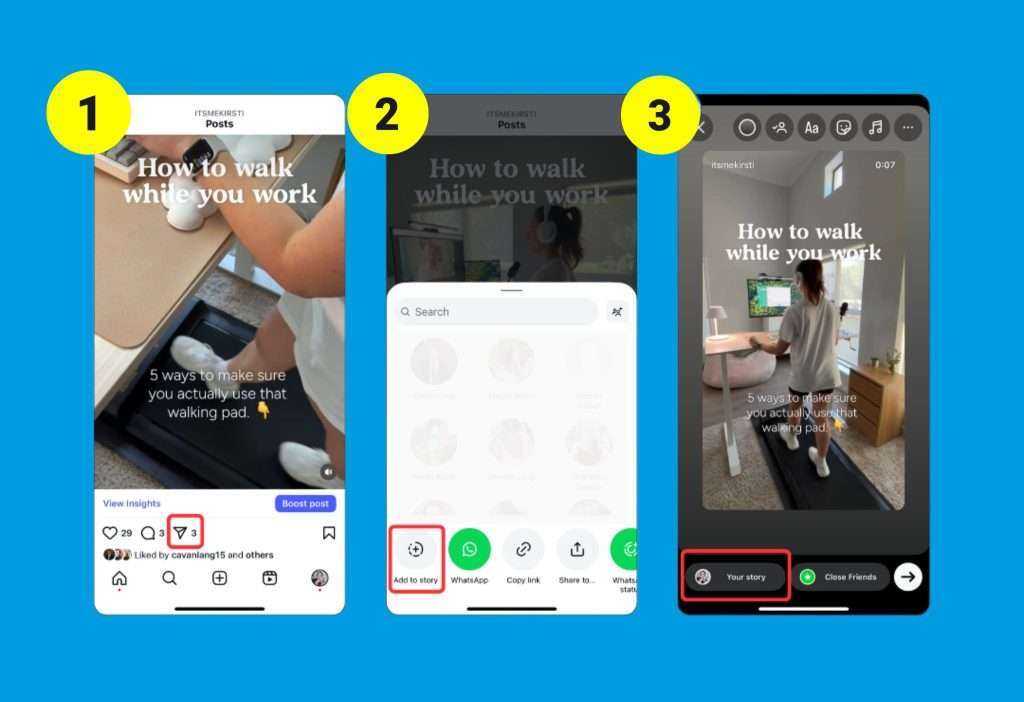
- To share a post, open the Instagram app and navigate to the content you want to feature. Tap the paper airplane icon beneath the post, the same button used for sending a direct message.
- From there, select “Add to story.”
- Instagram will automatically place the post into a Story draft, where you can reposition it, resize it, rotate it, and personalize it with text, GIFs, stickers, drawings, or anything else that matches your style. Once you’re satisfied, tap “Your Story” to publish it. The process is quick, simple, and instantly puts the post in front of followers who regularly watch your Stories.
Whenever you share a feed post to your Story, Instagram includes the original creator’s username and embeds a direct link back to the post. Anyone who taps the preview will go straight to the original feed content, which makes resharing helpful for boosting discovery and engagement. This feature, however, is only available inside the Instagram mobile app. The desktop version of Instagram does not allow users to share posts to Stories.
If you want to give your Story a bit more personality, adding context, commentary, GIFs, or stickers before publishing can make the reshare feel more engaging. Even a small caption adds value for people who view your Stories and encourages them to click through to the original post. And if your own account is public but you prefer not to let others share your posts to their Stories, you can disable this option in Settings → Privacy → Story.
Tips for making reposted content more engaging
Sharing a feed post to your Instagram Story is already a strong way to boost reach, but adding a bit of creativity can make it perform even better. Even the smallest layer of context can help your followers understand why you’re resharing something and why it matters. A short caption that explains the value of the post, highlights a key insight, or adds a playful comment gives viewers a reason to tap through and check out the original content. Something as simple as calling attention to a lesson, a moment behind the scenes, or a relatable thought instantly makes your repost feel more intentional.
Stickers are another powerful tool inside Instagram Stories. A poll, emoji slider, or question box transforms a passive view into an active interaction, and that simple engagement can help your Story rank higher for more of your audience. When your Story performs well, your feed post benefits too, since more people will tap through and engage with the original content. Even a quick reaction question like “What do you think?” or “Would you try this?” can spark the kind of interaction the algorithm loves.
If you’re comfortable showing up on camera, adding a short video before you repost your feed content is an easy way to strengthen the connection with your audience. A few seconds of commentary — maybe the story behind your tip, an unexpected detail, or how the post came to life — brings authenticity and personality to the repost. Ending with something like “I’ll share the post next so you can check it out” guides viewers straight to the original content.
Why you can’t share Instagram a post to story
If you can’t share a post to your Instagram Story, even after tapping the paper airplane icon, a few common issues might be behind it. The most frequent cause is that the post comes from a private account, and Instagram doesn’t allow private posts to be reshared to Stories, even if you follow the user. Only public posts can be reshared.
Another possibility is that the creator has disabled resharing through their privacy settings. Instagram gives every user the ability to turn off Story resharing entirely, so if they’ve switched it off, the option simply won’t appear for you. You can check your own setting by opening Settings, selecting Privacy, then Story, and making sure the “Allow Resharing to Stories” option is enabled.
Sometimes the issue is technical. Outdated app versions can cause certain features to stop working, so a quick update or logging out and back in can resolve the problem. And if you’re browsing on Instagram’s website instead of the app, the option won’t appear at all, since resharing posts to Stories is only available on the mobile app.
Sharing your posts to stories is a win-win
Reposting your Instagram Reels, carousels, and photos to your Story is one of the most effortless, high-impact actions you can take. It ensures your most engaged followers see your newest content quickly and increases the chances of more likes, comments, and saves. Beyond boosting performance, Stories give you the space to add extra layers — a bit of personality, context, or commentary — that help your audience feel more connected to you. If you’re serious about growing on Instagram, making Story resharing part of your posting routine is a simple habit that pays off every time.
Recommended for you:
- If you’re a Shopify merchant and want to grow faster with apps instead of manual work, explore all our tools here: Orichi Shopify Apps
- Want to turn Story viewers into long-term followers? Read How to Get 1000 Instagram Followers:
- If you care more about real, engaged followers than vanity numbers, check out How to Get More Real Followers on Instagram
- For better reach on both feed posts and Stories, learn the Best Time to Post on Instagram so your content hits when your audience is online
- Using Reels in your Stories? Boost discovery with the right tags in Hashtags for Instagram Reels
- Want to add more fun content into your Stories? See How to Upload a GIF to Instagram (2025 Tutorial) for step-by-step GIF posting
- If you run a website or Shopify store, learn Why You Should Embed Instagram Feeds on Website to turn Story + feed content into on-site social proof
- Using Shopify and want Instagram-style feeds on your store? Explore Top 5 Best Instagram Feed for Shopify
- Looking for an easier way to manage all your social channels together? Read Mastering Cross-Posting on Social Media to repurpose your Instagram content smarter