If a shopper clicks Checkout on your Shopify store and lands on a payment page that is not yours, stop new shoppers from reaching that page first, then work out the cause. This guide lists the apps publicly linked to checkout hijacking reports in 2026, shows you how to check your own store, and walks you through recovery.
Seeing a fake payment page right now? In Shopify admin, open Online Store, switch store access from Public to Private, and click Update (Shopify’s steps). Then contact Shopify Support and the app maker. Keep the customer’s screenshot and the time it happened. Do not ask them to try paying again. You do not need to know the cause before you close the store.
If you only saw your app’s name in a report, check whether your store was actually affected first. Having the app installed is not proof that anything happened to your store.
What is Shopify checkout hijacking?
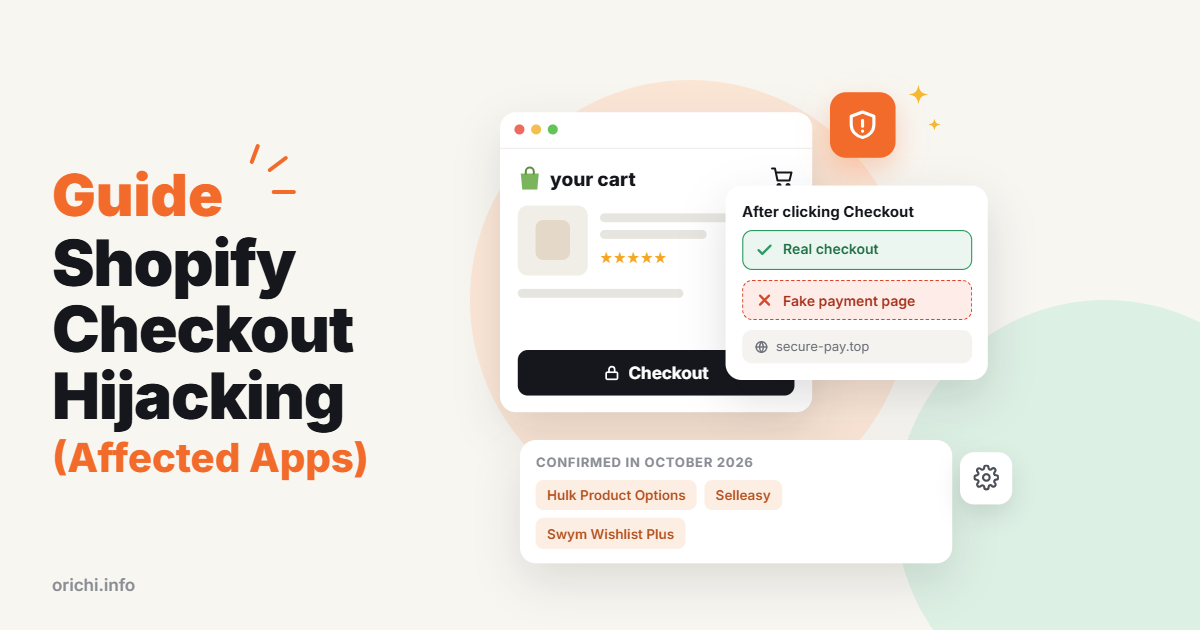
Checkout hijacking is when code on your storefront catches the shopper’s Checkout click and sends them to a fake payment page instead of your real Shopify checkout. The fake page looks close enough that most shoppers type in their card details without thinking twice.
In the 2026 cases, the bad code did not come from the merchant. It came through third-party apps: product options, upsell widgets, wishlists and similar tools. Someone got into the app’s settings or scripts and added a redirect, so every store loading that app could serve it without the merchant changing anything.
Shopify’s own checkout was not broken. In several reports, the fake page then passed the shopper on to the real checkout, so the order still went through and nobody noticed.
Three things make it easy to miss:
- Your orders may look normal. Either no order is created, or the shopper is forwarded to the real checkout after typing their card.
- It may happen once per visit. In the Hulk Product Options case, the script redirected the first Checkout click, then stayed quiet. A second try in the same browser looked fine (Roman Zipp’s investigation).
- You test while logged in. Old browser data can hide what a brand-new visitor sees.
A clean test today does not prove nobody was affected last week.
Start with the situation you are in
Pick the row that matches you, do the first action, then follow the steps further down.
| Your situation | Do this first | Then |
|---|---|---|
| A customer or your own test reached a strange payment page | Save the report and close that path (step 1) | Contact Shopify and the app maker right away |
| An app maker told you your store was affected | Keep the notice and follow its instructions for your store | Ask for your exposure window, what was fixed, and what customers may have typed |
| You use an app named in a report, but saw nothing wrong | Check the exact app name and any notice sent to your store | Run a fresh private-window test and ask the app maker if your store was in scope |
| Your app is not on any list, but checkout acts strangely | Investigate and close any unsafe path you can see | Do not treat a missing name as proof you are safe |
A normal checkout today does not prove nobody was exposed earlier. An app maker’s fix also does not tell you which shoppers may have reached a fake page.
Which Shopify apps have been linked to checkout hijacking?
Three apps are confirmed by their own makers for the October 2026 wave: Hulk Product Options, Selleasy and Swym Wishlist Plus. Other names appear in merchant reports but are not confirmed. The lists below cover apps named in public reports as of 26 October 2026. An app missing from them is not cleared, and an app on them is not a live safety rating.
October 2026: confirmed by the app maker
| App and date | What is known | What to do for your store |
|---|---|---|
| Hulk Product Options (HulkApps) — 10 Oct | Developer Roman Zipp traced a fake checkout on a live store to this app’s settings. HulkApps says unauthorized settings were added through an exploit and has since removed them. Shopify fixed the affected store within minutes of escalating it and temporarily disabled the app’s theme extension. | Ask HulkApps whether your store was affected and what was changed. This does not implicate every HulkApps product. |
| Selleasy (Logbase) — 13 Oct | Logbase confirms a script was injected into some stores and sent shoppers to an outside phishing page. It says it removed the code the same day, locked the custom code setting and found no breach of its own database. | Ask for your store’s exposure window and proof of the fix. “Our database was safe” does not cover what shoppers typed into the fake page. |
| Swym Wishlist Plus (Swym) — 14 Oct | Swym says an unauthorized settings change loaded a script on some stores between about 10:06 and 11:56 UTC that could redirect Checkout clicks. It removed the code, rotated credentials, paused the app for all merchants on 20 Oct and began restoring access in batches by 23 Oct (Tech Help Canada). | Ask which Swym notice applies to you and your exposure window. Check your checkout again when your access is restored. |
October 2026: named in reports, not confirmed
| App and date | What is known | What to do for your store |
|---|---|---|
| Boost AI Search & Filter (Boost Commerce) — reported 17 Oct | An agency on the Shopify Community linked a redirect to this app. Boost’s status page confirms a storefront outage restored on 18 Oct but does not mention phishing. Delisted 18 Oct. | Ask Boost about the redirect report separately from the outage. This is not Shopify’s own Search & Discovery app. |
| Privy (popups and displays) — reported 17 Oct | A commenter blamed Privy, without technical proof. Privy’s status page confirms displays went offline, not a checkout hijack. Delisted 18 Oct. | Ask Privy for instructions for your store. An outage alone does not mean customers were affected. |
| Rebuy Personalization Engine (Rebuy) — delisted 18 Oct | Removed from the App Store with no public link to the attack (Trafik+). | Ask Rebuy why it was delisted and whether your store needs to act. |
| Unknown app — 19 Oct | A consultant reported every visitor of one store being sent to checkout-guard[.]top for about ten minutes. The source app was not found. | A reminder that the list is incomplete. Test your own checkout. |
Earlier 2026 incidents
These matter if an older name shows up in a warning you receive. They are history, not current warnings.
| App and date | What is known | What to do for your store |
|---|---|---|
| Qikify Sticky Add to Cart and Qikify Mega Menu & Navigation — 22 Jul | Qikify confirms a redirect incident in both apps, resolved in July and separate from the October wave. | Check any notice sent to your store. Do not apply it to every Qikify product. |
| Hextom Announcement Bar — reported 30 Aug | A Reddit comment describes a similar fake checkout. Hextom has not confirmed it. | Confirm which Hextom app you use and ask Hextom about that date. |
| OC Quantity Breaks & Limit (Orichi) — 11 Sep | Orichi’s incident report confirms malicious JavaScript was added to campaign custom code and could redirect shoppers before checkout, between 09:29 and 18:00 (UTC+7). Orichi removed it that day and the app was relisted on 8 Oct after meeting extra security requirements. | Ask Orichi whether your store had an affected campaign and for your exposure window. |
| Fast Bundle — 17 Jul | A confirmed security attack, fully reinstated by 3 Aug. No fake checkout mechanism was reported. | Treat as a separate incident, not a checkout hijack. |
Some names on precautionary lists have no confirmed link: Hulk Contact Form Builder, Hulk Advanced Wishlist, Swym Back in Stock Alerts and Hextom Free Shipping Bar. Sharing a developer, or being installed alongside an affected app, is not enough to add an app to the list.
Why so many apps disappeared from the App Store
Shopify delisted 126 apps between 14 and 18 October, about 100 of them on 15 October (Trafik+). That is worth checking against your own app list, but it does not mean all 126 were hacked. Apps are also delisted for ordinary reasons, such as missing Shopify’s API update deadlines; support for API version 2025-10 ended on 16 October.
If an app you use was delisted, ask its maker why, whether installed copies are affected, and whether any notice applies to you. A delisting calls for questions, not a panicked mass uninstall.
What Shopify has changed
On 20 October, Shopify announced that stores would warn shoppers before sending them to outside websites. On 23 October it narrowed this: links to known malicious sites are blocked and suspicious sites show a warning, while other links open normally (Tech Help Canada). Brand-new phishing domains may not be flagged yet, so keep testing your own checkout. Shopify also asked app makers to tighten security that week.
Step 1: Stop the redirect
Your first job is to stop new shoppers reaching the fake page. You do not need to know the cause yet.
If you know which app is involved, turn off its storefront part. Open Online Store → Themes → Customize → App embeds, switch off that app’s embed and save (Shopify’s guide). Note the time. An app can add code in more than one place, so this may not remove everything.
If you are not sure which app is involved, make the store private:
- In Shopify admin, open Online Store.
- Open the access menu marked Public.
- Choose Private and click Update.
You can also use Online Store → Preferences → Store access. Use a store password that is different from your admin password (Shopify’s steps).
Check the result in a private window where you are not logged in. You should see the password page. Share that password only with the people fixing the problem.
- This only covers your Online Store. If you sell through a headless site or other channel, tell support.
- Pausing ads is not enough. Shoppers may already have your store open in a tab.
- Do not keep the store open just to record a better example.
Step 2: Keep a short record
Support moves faster with facts. Save the customer’s existing report rather than asking them to try again, and note:
- when it happened, with the time zone;
- which button or page they used just before the redirect, such as the cart drawer’s Checkout button;
- the fake page’s address and any screenshot already sent;
- device and browser, if known;
- any app maker notices and recent store changes;
- each step you took to stop it, and when.
Keep this somewhere private. Remove personal details before posting anything publicly. Never collect card numbers or security codes as evidence.
Step 3: Test every way to buy
The goal is to see what a brand-new visitor sees, without risking anyone’s details.
- Close all private windows, then open a fresh one.
- Add a normal product to the cart.
- Try each buy route your store offers: cart page, slide-out cart and any Buy now button.
- Stop as soon as the payment page loads. Check the address and how the page looks before typing anything.
- Write down the route, device, browser, time and what you saw.
Repeat on a phone. Never type real details into a page you suspect is fake. A different web address is not always bad: some real payment providers use their own pages, so compare against the payment methods set up in Shopify.
Fresh windows matter because the Hulk-related script remembered it had already redirected once in that browser session. A second try looked normal.
Step 4: Contact Shopify and the app maker
Contact both Shopify Support through the Help Center and the app maker. In admin, go to Settings → Apps → the app → Get support (Shopify’s guide). If the app was delisted, use the maker’s official website. Send one clear message you can copy from here:
Store name and contact:
Shopify / app maker case number:
App name and developer:
What we saw (or the notice we received):
First and last time seen, with time zone:
Button or page used, device and browser:
What we have turned off or restricted so far:
Evidence we can share securely:
Please confirm:
1. Was our store affected, and between which times?
2. What exactly was changed, and what did you fix?
3. What could customers have typed into the fake page?
4. Is anything still in our theme or settings that we must remove?
5. How can we confirm the fix on our store?
6. Is Shopify still restricting our store, and who will lift it?
7. When will we hear from you next?
A reply that only says “the app is safe now” does not answer these. Ask for each answer.
Step 5: Clean up and work out who was affected
Uninstalling an app does not always remove all its code (Shopify’s guide). Follow the app maker’s own removal steps. Do not delete theme code you do not recognize, and do not uninstall many apps at once in a panic: both can break the store and erase clues.
Review who has access to your admin and app dashboards, and turn on two-step login. These are good habits, but they will not remove a bad script that came in through an app.
Your order list is not a full list of affected people. A shopper may have typed their card into the fake page without placing a real order. Ask the app maker for your exact exposure window, then gather customer messages about strange pages, abandoned checkouts in that window, and what details the fake page asked for.
Step 6: Check the fix before you reopen
Only make the store public again when you can answer each question and know where the answer came from.
| Question | What you need |
|---|---|
| What was fixed? | The app or setting involved, the change made and the app maker’s confirmation |
| Does checkout work? | A fresh private-window test of every buy route, plus product options, quantities and cart totals |
| Is Shopify still restricting the store? | Written word from Shopify and who is handling it |
| What do we know about past exposure? | The time window, findings and open questions |
| Who owns each next step? | Named people for reopening, further checks and customer updates |
An app maker’s fix and Shopify’s permission to reopen are two different things. One Australian store, WAGD, was told by Shopify to stay closed even after the apps were fixed (iTnews). It is fine to reopen while some past questions are still open, as long as someone owns each one.
Step 7: Tell customers the truth, clearly
Customers need three things: what happened, what to do, and where to get updates. Keep what you know, what the app maker found and what is still open clearly separate. “We removed the app” is something you did. It does not mean “no details were taken.”
Subject: An update about checkout at [store name]
On [date, time and time zone], we found that [what you confirmed].
In plain terms, [what happened to shoppers].
We have [steps already taken].
[App maker] has confirmed [their finding and its date].
We are still checking [open questions].
If you [tried to pay] between [start] and [end],
please [action agreed with your payment provider].
Questions? Contact us at [official contact].
Our next update will be at [place] by [date].
If a customer says they typed card details into a suspicious page, tell them to call their card issuer using the number on the back of the card. Never ask them to send card details to your inbox.
Rules on telling customers and regulators differ by country. Ask your payment provider or a legal adviser early. The US FTC’s data breach response guide is a good starting point.
How to lower the risk next time
You cannot control how app makers protect their systems, but you can limit how much any one app can reach your checkout.
- Keep fewer apps. Every app that loads on your storefront is one more way in. Remove the ones you no longer use.
- Choose apps carefully. Look for clear security and support pages, an active changelog and a maker who publishes incident notices openly.
- Test checkout on a schedule. A two-minute fresh-window test each week, on desktop and phone, catches problems early.
- Watch your numbers. A sudden gap between carts started and orders completed is worth a look.
- Read app notices. Make sure emails from app makers reach someone who will act on them.
- Keep a simple app list. Note each app, what it does and who owns it. In an emergency, this saves hours.
Frequently asked questions
I use an app named in a report. Is my store compromised? Not necessarily. Run a fresh-window test and ask the app maker whether your store was in the affected group, and for which time window.
My app is not on any list. Am I safe? Not automatically. Public lists are never complete, as the unexplained checkout-guard[.]top case shows.
Will uninstalling the app fix it? It may stop the problem but leave code behind. Follow the maker’s removal steps and test again.
My checkout looks normal today. Was no one affected? A clean test only shows today. Ask the app maker about the past exposure window.
Was Shopify hacked? The reports point to third-party apps, not Shopify’s own checkout. Shopify has added warnings for known bad links and asked app makers to tighten security.
Do I have to notify customers? It depends on where you trade and what happened. Ask your payment provider or a legal adviser early.