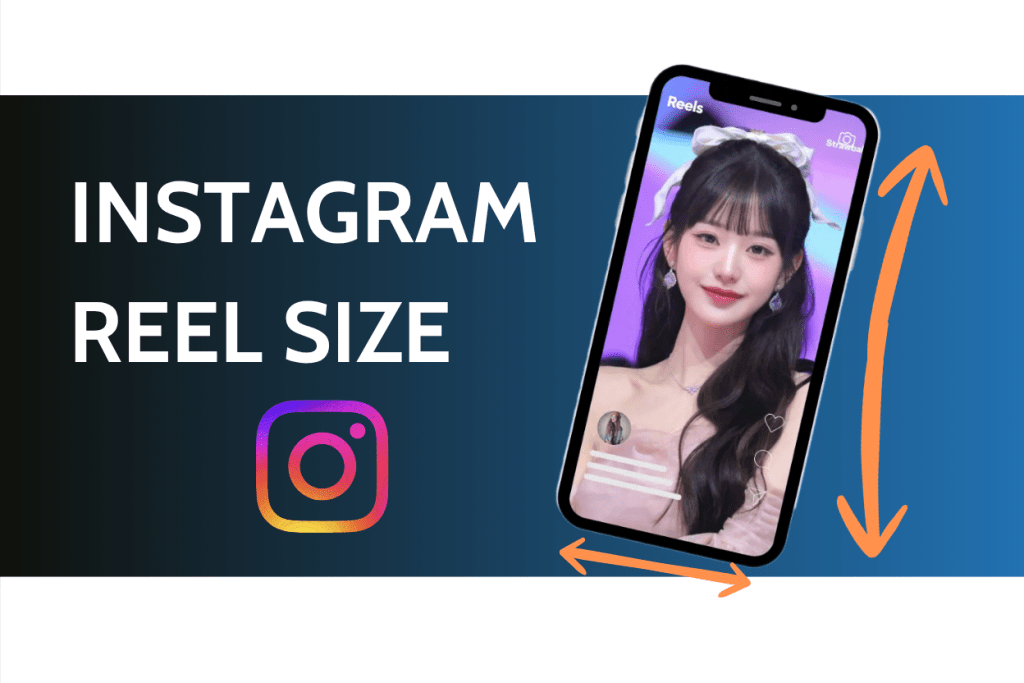
Instagram Reels Size: 1080×1920 (9:16). For instagram reel dimensions, keep key text/CTA centered to survive 4:5 feed + 1:1 grid crops; export ≥30fps, MP4/MOV, ≤4GB.. Perfect dimensions let your video fill the screen, avoid awkward crops, and grab attention in a scroll-heavy feed from the first frame. Whether you’re a creator, brand, or marketer, dialing in Instagram Reels dimensions, aspect ratio, and cover placement keeps visuals crisp, professional, and friendly to the algorithm.
In this ultimate guide, you’ll get everything you need—ideal 1080×1920 pixels with a 9:16 aspect ratio, safe-zone placement to protect on-screen text and key subjects, and cover size guidance that lands cleanly in your grid. You’ll also pick up practical pro tips to keep every Reel sharp, engaging, and consistent across devices. Master these standards to cut re-edits, maintain framing, and publish with confidence so your Reels are built for maximum reach throughout 2026.
Why Getting Your Instagram Reels Size Right Matters
Getting your Instagram Reels size right isn’t a minor tweak—it’s mission-critical for performance. Incorrect dimensions can crop out faces, trim product shots, or slice off text and CTAs; captions and UI elements may overlap your message; compression artifacts can creep in and make footage look fuzzy or stretched. Viewers instinctively scroll past anything that feels off-balance or low-quality, and that drop in watch time, retention, and replays sends weak signals back to the ranking system.
Use the correct 9:16 aspect ratio (vertical, full-screen) so your Reel fills the display edge to edge on mobile. Frame headlines, subtitles, and key visuals inside safe zones that avoid the caption block, buttons, and progress bar. Export at 1080×1920 pixels with a steady 30–60 fps and high bitrate to keep motion crisp and text razor sharp. When your creative fits the canvas, people watch longer, interact more, and are likelier to share—improving completion rate, average watch time, and engagement rate.
Those strong behavioral signals help the Instagram algorithm surface your Reel beyond followers—into the Reels feed and Explore. In short: precise dimensions protect your story, preserve brand polish, and unlock distribution. Get sizing right up front to reduce re-edits, prevent ugly crops, and give every post its best shot at reach in 2026.
The Essential Instagram Reel Dimensions for 2026
Use these up-to-date Instagram Reel size specs to keep quality crisp, prevent unexpected cropping across placements, and ensure smooth uploads and playback:
- Recommended size (pixels): 1080 × 1920
- Primary aspect ratio: 9:16 (full-screen vertical for Instagram Reels on mobile)
- Accepted aspect ratios in Instagram layouts: approximately 1.91:1 → 9:16
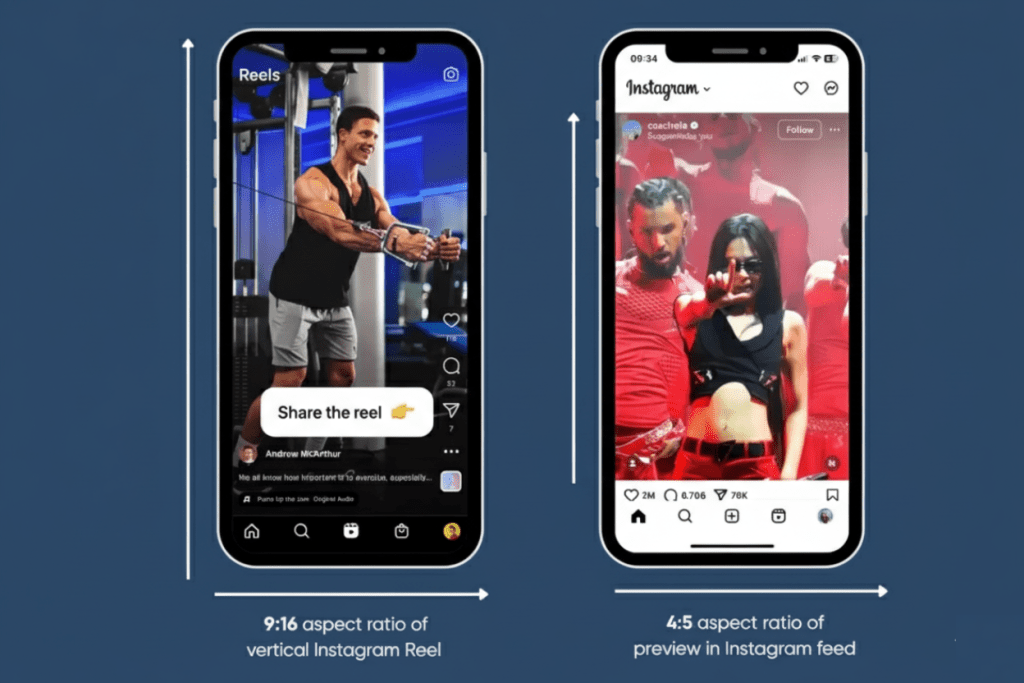
Reels may preview at 4:5 in the feed and 1:1 on the profile grid—design with central safe areas so hooks, subtitles, faces, logos, and CTAs remain visible in every placement.
- Minimum resolution: 720p (1080p is the practical “sweet spot” to reduce compression artifacts and preserve text clarity)
- Frame rate: ≥ 30 fps (60 fps optional for smoother motion and action shots)
- Max file size: up to ~4 GB
- File formats: MP4 (H.264 video / AAC audio) or MOV
Why these specs matter: Sticking to 1080 × 1920 at 9:16 delivers full-screen immersion on iOS and Android, while planning for 4:5 feed previews and 1:1 grid crops prevents UI elements (captions, buttons, progress bar) from covering key visuals or copy. Maintaining 1080p and ≥ 30 fps keeps motion clean and text razor-sharp, which supports higher watch time, completion rate, and engagement—helping your Reels look professional and perform reliably across Instagram placements in 2026.
Understanding the Instagram Reels Aspect Ratio
When creating Instagram Reels, the 9:16 aspect ratio isn’t just a guideline—it’s the official standard for full-screen mobile video. As confirmed by Outfy, Riverside, and OneStream, this vertical format mirrors the natural orientation of smartphone screens, delivering an edge-to-edge immersive experience that keeps viewers focused and engaged.
Why 9:16 Works Best Across Devices
Reels are built for mobile-first viewing, and the 9:16 format ensures your video fills the entire screen in portrait mode—no black bars, no awkward gaps. It keeps visuals consistent across Android and iOS, strengthens watch time, and sends stronger engagement signals to Instagram’s algorithm, boosting your chances of discovery in both Reels and Explore tabs.
Differences Between 9:16, 4:5, and 1:1 Ratios
- 9:16 (1080×1920 px) – The full-screen vertical format used for Reels and Stories. Ideal for immersive storytelling and recommended by all three key sources.
- 4:5 (1080×1350 px) – The typical feed preview crop that shows only the center portion of your video. Avoid placing text or graphics near the top or bottom edges to prevent cutoffs.
- 1:1 (1080×1080 px) – The square thumbnail seen on your profile grid. Only the middle section of your Reel appears, so position key visuals within this area for a clean, professional grid layout.
How Instagram Crops Your Reels for Feed and Grid Previews
According to Riverside’s formatting guide, Instagram automatically adjusts Reel framing based on placement. In the Reels tab, your full 9:16 video displays. In the main feed, the visible crop shifts to 4:5, and on your profile grid, it becomes 1:1. Titles, faces, or text positioned too close to the edges can get trimmed. To prevent this, always center key subjects and captions within the middle 4:5 safe zone of your 9:16 canvas. This ensures your video looks perfectly framed and balanced across all Instagram surfaces—Reels, feed, and profile grid alike.
Instagram Reel Resolution & Format Specs
Recommended export: 1080p @ 30fps, MP4 (H.264 video + AAC audio).
This combo keeps files lightweight, looks crisp on mobile, and avoids heavy in-app compression.
Avoid blurry compression:
- Turn on Instagram’s “Upload at highest quality” setting.
- Export at 1080 × 1920 (9:16) and keep a clean master (don’t re-export the same file multiple times).
- If you shot in 4K, downscale to 1080p on export for best results.
Resolution guide (what to use when):
| Quality | Pixel Size | Frame Rate | When to use |
| Full HD | 1080 × 1920 | 30–60 fps | Default for Reels; best balance of clarity + file size |
| HD | 720 × 1280 | 30 fps | Only if bandwidth/device limits; expect softer image |
| 4K capture (export 1080p) | 2160 × 3840 (capture) → 1080 × 1920 (export) | 60 fps (capture) | Shoot high, edit/color with more detail, then downscale to a sharper 1080p master |
Formats & audio:
- Container: MP4 (preferred) or MOV
- Video codec: H.264 (AVC)
- Audio codec: AAC, 44.1–48 kHz
- Bitrate: use a moderate VBR—high enough to avoid artifacts, not so high that IG crushes it.
Quick checklist:
- Project canvas 9:16 at 1080 × 1920.
- 30 fps minimum; 60 fps for fast motion/smoother look.
- Export MP4 (H.264/AAC), enable highest quality upload in the app.
- Preview before posting to ensure no unexpected softening or banding.
Mastering Your Instagram Reel Cover (Thumbnail)
Your Instagram Reel cover (thumbnail) is the face of your video—it must earn the tap before playback begins. As OneStream, Outfy, and Riverside all note, design the cover at the same proportions as your Reel and keep vital elements centered within safe zones to protect them across placements.
Cover size (master): 1080 × 1920 px (9:16)
Match your Reel to preserve clarity, avoid distortion, and ensure a clean full-screen presentation on iOS and Android.
Profile grid preview (1:1 center focus):
Instagram crops the cover to a square (1:1) on your grid—usually the middle of the frame. Place key subjects, titles, logos, and brand marks inside the central square so the grid stays balanced and nothing essential gets cut.
Feed preview (4:5 safe zone):
In the main feed, Reels render at 4:5, trimming the top and bottom. Keep hooks, faces, subtitles, and CTAs within the central 4:5 to avoid crop loss and UI overlap (captions, buttons, progress bar).
Pro tip:
Keep text away from the edges and lower third where captions and buttons can cover it. Use editors like Canva or CapCut with 1:1 and 4:5 guides to visualize crops and lock your layout before export. Designing once for 9:16, while honoring 4:5 and 1:1 safe zones, delivers a consistent, professional thumbnail that boosts taps, retention, and reach.
Read more: The Ultimate Guide to Facebook and Instagram Image Sizes in 2025
Instagram Reels Length and Duration
Max length: As of 2025, most accounts can publish Reels up to 90 seconds. While some users may see extended limits rolling out, plan, script, and edit for the 90-second cap to ensure consistent performance, fewer upload errors, and reliable playback across iOS and Android.
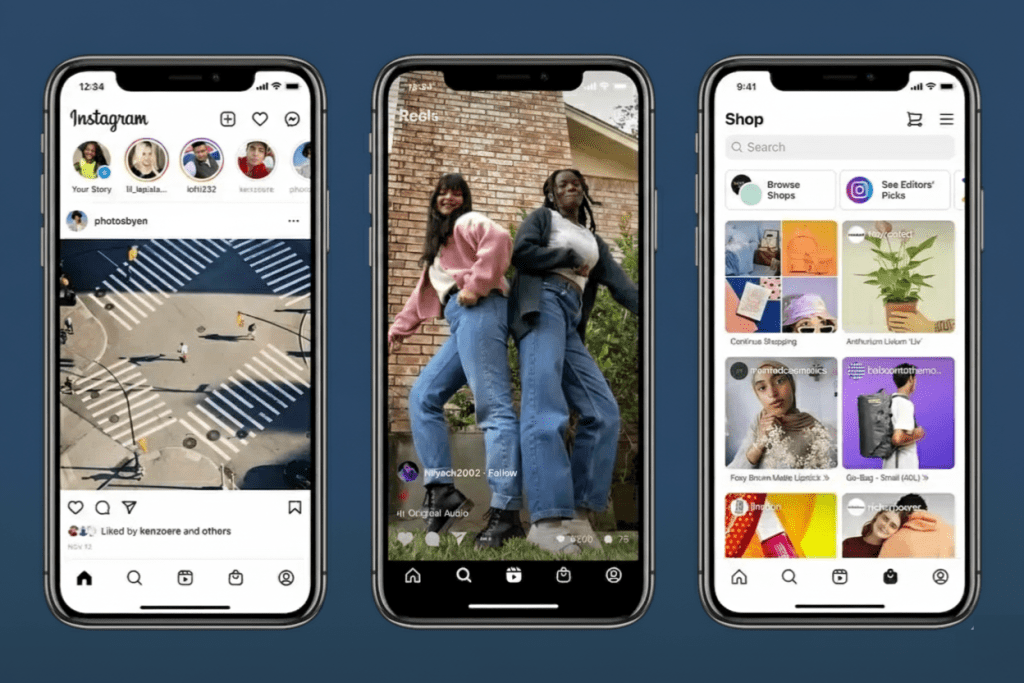
Best-performing durations: Shorter Reels win more often. Aim for 7–15 seconds to deliver one clear idea with a strong hook. Compact clips are easier to finish, rewatch, and share—behavioral signals (completion rate, watch time, replays) that help your Reel travel farther in Reels and Explore.
Why shorter often outperforms longer:
Faster hook → higher retention: You have ~3 seconds to earn attention; tight openers reduce early drop-off.
Higher completion likelihood: Finishing sends positive signals; shorter runtimes boost completion rate.
Loopability: Seamless endings encourage replays, lifting total watch time without padding length.
Clarity over complexity: One message per Reel is easier to grasp in a busy, mobile-first feed.
Pro tips:
Lead with the payoff (result, reveal, transformation) in the first 1–3 seconds.
Cut visually every 1.5–2.5 seconds to maintain pace and visual freshness.
Land a crisp CTA before the final second (follow, save, comment, click bio).
Text Blind Spots & Safe Zones (Don’t Get Cropped!)
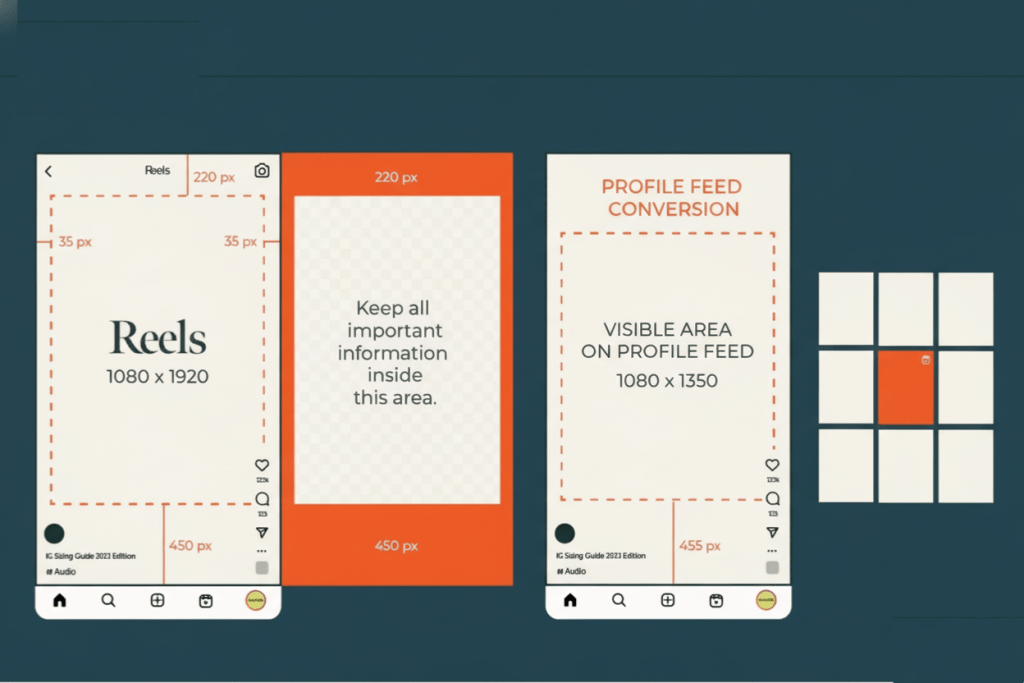
Design every Reel on a 1080 × 1920 (9:16) canvas, but remember that Instagram crops differently by placement. Protect headlines, logos, faces, and CTAs by parking them inside the central safe zones below.
1) Feed preview (4:5 crop) — the big one to plan for
The feed exposes only a 4:5 slice of your 9:16 video (visible height = 1350 px from a 1920-px frame).
Instagram trims roughly (1920 − 1350) / 2 ≈ 285 px from both the top and bottom.
Practical rule: keep key text/CTAs between y ≈ 285 px and y ≈ 1635 px.
Prefer a round buffer? Avoid the top ~250 px and bottom ~310 px for headlines, logos, and lower-thirds to dodge captions and UI creep.
2) Profile grid (1:1 thumbnail) — center focus
Your grid thumbnail is a square 1:1 (1080 × 1080) centered inside the 9:16 frame.
It crops about (1920 − 1080) / 2 = 420 px from both top and bottom.
Place brand marks, faces, and titles within the central 1080 × 1080 so the grid stays clean, legible, and clickable.
3) Full-screen Reels tab (9:16) — still avoid UI overlap
Even in full 9:16, captions, buttons, and the progress bar overlay the lower band.
Keep subtitles and CTAs above the bottom UI zone (avoid the last ~10–15% of the canvas ≈ y > 1630–1725 px on a 1920-px height).
4) Layout recipe you can reuse (guides)
On a 1080 × 1920 comp, add two centered guides:
4:5 safe frame: 1080 × 1350 (for feed).
1:1 safe frame: 1080 × 1080 (for grid).
Place all important elements inside both frames (text prioritized for 4:5, hero visual prioritized for 1:1).
5) Always preview before posting
Drafts → Feed preview: scrub through and check that no text kisses the edges or hides under captions.
Profile grid → Thumbnail picker: confirm your cover crops cleanly to 1:1.
If something clips, nudge inward a few pixels, re-preview, and re-export if needed.
Common Instagram Reel Size Mistakes to Avoid
Even strong ideas can underperform if the format is off. Many creators lose reach not for lack of creativity—but because their Reels don’t match Instagram’s visual specs. Avoid these common Instagram Reel size mistakes to keep videos sharp, aligned, and fully visible across placements.
Exporting horizontal (16:9) videos Instagram is vertical-first. A landscape 16:9 clip creates black bars top and bottom (pillarboxing), breaking immersion and depressing watch time. Always shoot or resize to vertical 9:16 before uploading to preserve a full-screen, edge-to-edge look.
Using low resolution or the wrong aspect ratio Anything below 720p softens further after Instagram compression. Stick with 1080 × 1920 (Full HD) at the correct 9:16 aspect ratio to maintain clarity, crisp text, and professional quality across Android and iOS.
Ignoring thumbnail alignment for grid view Your profile grid shows only the center 1:1 square (1080 × 1080 px). If your subject or title sits near the edges, it will be cropped out. Design your cover so key faces, titles, and logos fall within the central square for a clean, clickable grid.
Adding text outside safe zones Captions, buttons, and UI overlays can block the upper and lower areas. Keep headlines, subtitles, CTAs, and essential visuals inside the middle 4:5 zone (≈ 1080 × 1350 px)—roughly between y ≈ 285 px and y ≈ 1635 px on a 1080 × 1920 canvas—to avoid cutoffs.
Forgetting to preview before posting
Don’t skip the final check. In Drafts, preview how your Reel appears in the feed (4:5), the profile grid (1:1), and the Reels tab (9:16). If any element hugs an edge, nudge it inward a few pixels and re-check to prevent unwanted cropping, pixelation, or misalignment.
Quick Instagram Reel Size Cheat Sheet (2025)
| Element | Specification |
| Ratio | 9:16 (vertical, full-screen Reels standard) |
| Size (px) | 1080 × 1920 (Full HD canvas) |
| FPS | 30–60 (≥30 fps baseline; 60 fps for smoother motion) |
| Format | MP4 (H.264 video / AAC audio) |
| Max Length | 90 seconds (plan, script, and edit for this cap) |
| Cover | 1080 × 1920; keep key elements within 1:1 for grid and 4:5 for feed previews |
| Safe Zone | Avoid top/bottom UI areas; treat the central 4:5 as text-safe and center subjects for 1:1 grid crop |
Pro Tips for High-Quality Reels
Shoot native vertical (9:16). Frame for full-screen portrait from the start—no last-minute crops. Lock exposure and focus, stabilize your phone or use a gimbal, and light your subject well to prevent grain and flicker.
Use correct presets in editing tools. Set your project to 1080 × 1920, 9:16, 30–60 fps in CapCut/Premiere/Canva. Add 4:5 and 1:1 guides so text, subtitles, logos, and CTAs stay inside safe zones across feed and grid.
Export smart to reduce compression. Export MP4 (H.264/AAC) with a moderate VBR bitrate. Avoid re-encoding the same file multiple times. If you shot 4K, downscale to 1080p on export for cleaner detail and fewer artifacts.
Enable “Upload at highest quality.” Instagram app → Settings → Media quality → toggle Upload at highest quality to minimize in-app softening and preserve sharp edges and text.
Master the first 3 seconds. Front-load the payoff (result/reveal/transformation). Cut every 1.5–2.5 s to maintain pace, and keep framing tight to spike retention and watch time.
Caption for silent viewers. Use burned-in subtitles or concise overlays; keep lines short, high-contrast, and positioned within the central 4:5 area for readability.
Sound still matters. Choose trending audio or clean VO. Normalize loudness, avoid clipping/peaks, and trim dead air so the track supports the hook.
Design clickable covers. Create a 1080 × 1920 cover; center key elements for 1:1 grid and keep titles inside 4:5 for feed previews.
Test before posting. In Drafts, preview Reels (9:16), feed crop (4:5), and grid crop (1:1). If any text kisses an edge or hides under UI, nudge it inward a few pixels and re-check.
Driving traffic from Instagram or Facebook only works if conversion data not errors is tracked correctly. When events fail to fire, mismatch, or duplicate, ad performance metrics quickly become unreliable.
FAQs on Instagram Reels Size and Specifications
- What is the recommended Instagram Reel size in pixels?
1080 × 1920 px (vertical, 9:16). This fills the screen cleanly on iOS and Android and helps minimize compression artifacts. - Are Instagram Reels 9:16 or 4:5?
Reels are 9:16 by default. In the feed preview, Instagram crops to 4:5, and on your profile grid the thumbnail displays as 1:1. Design within central safe zones so titles, faces, and CTAs remain visible in every placement. - What’s the best resolution for Reels?
1080p (Full HD) is the sweet spot. 720p is the minimum acceptable; resolutions higher than 1080p are typically downscaled by Instagram, which can add compression. - What’s the maximum length for Instagram Reels?
Plan for up to 90 seconds for consistent posting across accounts. (Instagram is rolling out longer limits to some users, but ≤90 s remains the safest target.) Short formats (7–15 s) often perform best for retention and completion rate. - Are Reels supported in 4K?
No native 4K playback yet. You can shoot in 4K for flexibility, then downscale to 1080p on export for a sharper master without triggering excessive in-app compression.