When it comes to boosting sales on Shopify, most merchants focus on getting more traffic or launching new products. But there’s a quieter, smarter tactic that can dramatically increase your revenue—upselling. It’s the simple act of offering your customers a more valuable version of what they’re already planning to buy.
Upselling isn’t about being pushy. Done right, it’s about helping your customer discover a better fit for their needs—whether that means a larger size, a more premium version, or a bundle that saves them money in the long run. And here’s the best part: you don’t need to overhaul your entire store or hire a marketing team to make it work.
In this article, we’ll show you how to upsell effectively on Shopify without ruining the customer experience. Whether you’re a first-time seller or an experienced brand looking to refine your strategy, these tips and tools will help you drive more value from every transaction—naturally and ethically.
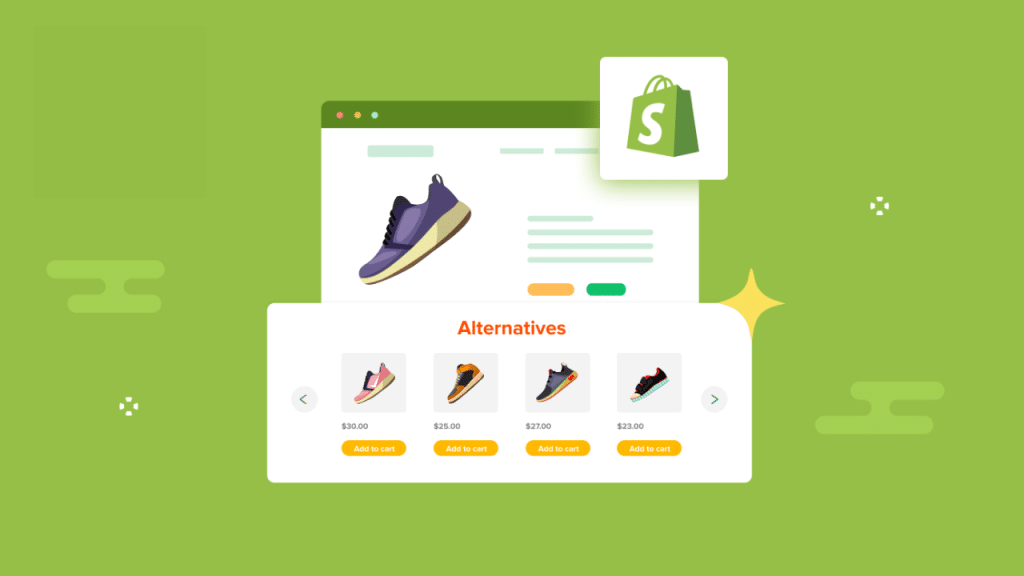
What is Upselling?
Let’s break it down. Upselling is a sales technique where you encourage customers to purchase a more expensive or upgraded version of the item they’re already considering. It’s often confused with cross-selling, which is about offering complementary products (like selling a phone case along with a phone). While both can be effective, upselling tends to have a higher conversion rate because you’re working with a product the customer already wants.
Think of it this way: someone’s about to buy a laptop. An upsell could be the same laptop with more storage, faster RAM, or a longer warranty. The offer enhances the original product—making the customer feel like they’re making a smarter purchase.
And this is key: upselling isn’t about tricking anyone. It’s about adding value. When you understand what your customers really need, upselling becomes a form of service, not salesmanship. It leads to better satisfaction, stronger brand trust, and yes—higher revenue.

When Is the Right Time to Upsell?
Timing is everything when it comes to upselling. Offer a suggestion too soon, and it feels irrelevant. Offer it too late, and the customer’s decision is already locked in. The sweet spot lies in understanding the natural flow of the buying journey—and fitting your upsell exactly where it makes sense.
Before Purchase (Product Page)
- Recommend a premium version or bundle right on the product page.
- Example: If someone’s viewing a $50 backpack, suggest the $70 version with waterproof fabric and extra compartments.
- Make sure the offer clearly adds value—not just price.
During Checkout (Cart & Payment)
- This is one of the most effective times to upsell.
- Use simple prompts like:
- “Add for just $10 more”
- “Upgrade and save 15%”
- These offers work because the customer is already committed and open to last-minute enhancements.
After Purchase (Thank-You Page or Follow-Up Email)
- Don’t stop upselling just because the transaction is over.
- Use the post-purchase moment to offer upgrades, refills, or complementary items.
- This is a low-pressure, high-trust window—perfect for increasing lifetime value.
In short, upselling should feel like a natural part of the shopping experience—not an interruption. When your timing aligns with customer intent, conversions rise and satisfaction follows.
Checklists to Upsell Effectively
To upsell successfully, you need more than just a higher-priced product—you need the right offer, presented at the right time, in the right way. Here are the essential best practices to follow if you want to upsell without coming across as pushy or sales-driven:
- Make It Relevant
The golden rule of upselling is relevance. Your offer should closely match the customer’s intent and current selection. If someone is buying a basic smartwatch, upselling them a premium version with advanced health tracking makes sense. Trying to sell them a totally different product—like headphones—can feel random and intrusive. Relevance builds trust and makes the upsell feel helpful rather than forced. - Focus on Value, Not Just Price
A higher price tag alone isn’t persuasive. You need to clearly communicate why the upgraded option is better. Does it last longer? Offer more features? Save time or money in the long run? When customers see real benefits—not just a bigger bill—they’re far more likely to say yes. - Use Clear, Visual Comparisons
Shoppers love clarity. Use visuals like side-by-side product comparisons or icons that highlight key upgrades. Badges such as “Most Popular” or “Best Value” can guide decisions. Keep your language simple and benefits front-and-center. People don’t want to do mental math during checkout—they want obvious, instant value. - Don’t Overwhelm with Options
One or two strong, well-placed upsell offers are far more effective than a long list of choices. When people are faced with too many options, they often make no choice at all. Keep it clean and targeted—less is more. - Be Transparent with Pricing
Hidden fees or surprise add-ons can break trust quickly. If your upsell costs more, say so—clearly and confidently. Transparency actually increases conversions because it removes hesitation and second-guessing. - Respect Customer Choice
A good upsell strategy is never aggressive. Always offer an easy “No thanks” button or allow customers to skip the offer entirely. When people feel in control, they’re more open to future offers—even if they decline this one. - Test Everything—and Keep Optimizing
What works for one product or audience may not work for another. Use A/B testing to try different offers, placements, and copy. Test offering an upsell on the product page vs. at checkout. See whether bundling works better than upgrading. Upselling is part art, part science—and ongoing testing is where the real magic happens.
The best upselling doesn’t feel like selling at all. It feels like helpful advice from a store associate who actually understands your needs. On Shopify, where customer experience is everything, getting this right can make all the difference—not just in revenue, but in long-term loyalty.
Top Shopify Upsell Apps You Should Try
Choosing the right upsell app can make a huge difference in how effectively you convert customers and increase your average order value. Below are some of the most popular and high-performing upsell apps on Shopify, each with unique strengths to fit different business models and strategies.
1. ReConvert Post Purchase Upsell
ReConvert is designed to help merchants upsell customers after they’ve made a purchase—an often overlooked but powerful moment. With a focus on customizing the thank-you page, ReConvert turns it into a conversion tool instead of just a confirmation screen.
Key Features:
- Drag-and-drop editor for customizing thank-you pages
- Smart product recommendations based on customer behavior
- Countdown timers, pop-ups, and personalized messages
- Integration with email and SMS marketing tools

Pros:
- Easy to use with a low learning curve
- Highly effective post-purchase offers without interrupting checkout
- Excellent support and frequent updates
Cons:
- Limited upsell functionality before purchase
- Some advanced features only available on higher tiers
Pricing:
- Free plan (up to 50 orders/month)
- Paid plans start at $4.99/month and scale based on monthly orders
2. Zipify OneClickUpsell (OCU)
OneClickUpsell by Zipify is one of the most robust upselling tools available for Shopify. It focuses on in-cart and post-purchase upsells, helping merchants increase revenue without hurting the customer journey.
Key Features:
- Pre-purchase and post-purchase upsell funnels
- Mobile-optimized and fast-loading offers
- Built-in A/B testing
- Seamless Shopify Plus checkout integration

Pros:
- Clean, high-converting offer templates
- Deep analytics and split testing
- Great for stores with large average order values
Cons:
- Only Shopify Plus users can fully customize the checkout page
- Higher cost than most apps
Pricing:
- Plans start at $35/month
- 30-day free trial available
3. Honeycomb Upsell & Cross Sell
Honeycomb gives store owners the ability to design visually engaging upsell and cross-sell funnels with logic-based targeting. It’s ideal for brands that want more granular control over when and how offers are shown.
Key Features:
- Multi-step upsell and cross-sell funnels
- Conditional logic based on cart contents or order value
- Pre-designed templates and full customization
- Real-time analytics dashboard

Pros:
- Highly customizable flows
- Smooth interface with Shopify
- Great for bundling and targeted offers
Cons:
- Learning curve if creating complex funnels
- Limited A/B testing features
Pricing:
- Free plan for stores with low traffic
- Paid plans start at $49.99/month
4. Bold Upsell
Bold Upsell is a veteran in the Shopify ecosystem, offering trigger-based upsells that appear when customers add products to their cart or try to checkout. It’s a powerful tool for offering upgrades, bundles, or add-ons.
Key Features:
- Upsell/cross-sell based on cart behavior
- Smart suggestions (e.g., “Buy X, get Y”)
- Customizable design for pop-up offers
- Inventory-aware offers (shows only what’s in stock)

Pros:
- Great flexibility and targeting options
- Works well with other Bold apps
- Reliable performance across store sizes
Cons:
- Interface can feel dated
- Requires more setup compared to plug-and-play tools
Pricing:
- Starts at $9.99/month
- 14-day free trial
5. Frequently Bought Together by Code Black Belt
Frequently Bought Together uses data-driven logic to recommend product bundles, making it perfect for cross-selling but also helpful for strategic upsells. Think of it as Amazon-style “people also bought” functionality.
Key Features:
- AI-based product bundle suggestions
- Customizable widget layout and appearance
- One-click add-to-cart for multiple items
- Compatible with most Shopify themes

Pros:
- Increases both upsells and cross-sells effortlessly
- Very simple to install and use
- Low maintenance once set up
Cons:
- Not designed for in-checkout or post-purchase upsells
- Limited targeting logic
Pricing:
- Flat rate of $9.99/month
- 30-day free trial
How to Measure Your Upselling Strategy
No upsell strategy is complete without tracking performance. To know whether your efforts are actually working, you need to measure the right metrics—and adjust accordingly.
Start with Average Order Value (AOV). This is your core indicator of upsell success. If AOV increases after implementing upsells, you’re on the right path. Also keep an eye on your conversion rate, as too many or poorly placed upsells can cause buyer friction. Lastly, track revenue per visitor, which gives you a broader view of the financial impact.
Use Shopify Analytics for a high-level overview, and dive into upsell app dashboards for more granular data like which offers are converting, drop-off rates, and A/B test results.
Remember, upselling isn’t a one-time tactic. It’s an evolving process. Keep testing different offers, placements, and wording—and let the data guide your strategy.
Final Thoughts: Make Upselling a Natural Part of Your Store
Upselling on Shopify isn’t just about squeezing out more revenue—it’s about adding genuine value to your customer’s shopping experience. When you offer a product that truly fits their needs better, you’re not being salesy—you’re being helpful.
The key is to upsell thoughtfully and strategically. Focus on relevance, timing, and clarity. Use data to guide your decisions, and never lose sight of the customer experience. Whether you’re suggesting a premium version of a product or offering a smart bundle, the best upsells feel natural, not forced.
With the right tools—like ReConvert, Zipify OCU, or Bold Upsell—and a bit of testing, any Shopify store can turn upselling into a consistent growth lever. Start small, stay customer-focused, and keep refining your approach.
In the end, great upselling isn’t about selling more—it’s about helping your customers get more. And that’s a win for everyone.