Running Google Ads is not just about creating campaigns and watching clicks.
You also need to research keywords, check competitor websites, verify tags, inspect analytics data, and make sure your conversion tracking is actually working.
That is where Chrome extensions can save time.
Instead of switching between several dashboards or digging through code every time you want to check something, the right extension can put useful information directly in your browser.
This list covers free Chrome extensions for different parts of an advertising workflow, from keyword research and competitor analysis to Google tag debugging and ad pixel verification.
1. Keywordme
Best for: Google Ads keyword cleanup and expansion
Keywordme is a Chrome extension focused specifically on Google Ads keyword optimization. It is designed to help advertisers work with search terms, identify keywords to add or exclude, and expand campaign keyword lists.
Where This Tool Shines
Keywordme is most useful when you already have search-term data but need to turn that data into cleaner keyword lists.
For example, you may want to:
- Find negative keywords
- Identify useful search terms
- Expand existing keyword lists
- Organize keywords by match type
- Reduce irrelevant queries
Key Features
The current Chrome Web Store listing describes Keywordme as an AI-powered Google Ads keyword optimization tool with features for search-term cleanup, negative and positive keyword lists, campaign keyword expansion, and match types.
Best For
Google Ads advertisers who spend a lot of time reviewing search terms and managing keyword lists.
Pricing
The Chrome extension is available through the Chrome Web Store. Check the current listing for the latest availability and pricing of any paid features.
2. Google Ads Editor Companion
Best for: Working alongside Google Ads Editor
Google Ads Editor is designed for advertisers who manage campaigns outside the standard Google Ads interface. A companion-style browser extension can be useful when your workflow involves moving between campaign information and browser-based research.
Where This Tool Shines
This type of tool is most useful for advertisers who already have a structured Google Ads workflow and need browser support around campaign management.
It can be particularly helpful when you are:
- Researching campaign ideas
- Reviewing existing account information
- Moving between browser research and campaign management
- Working with large campaign structures
Key Features
The exact features and availability of third-party Google Ads Editor companion extensions can change, so verify the current Chrome Web Store listing before publishing specific feature claims.
Best For
Advertisers already using Google Ads Editor as part of their campaign workflow.
Pricing
Check the current Chrome Web Store listing for availability and pricing.
3. Keyword Surfer
Best for: Keyword research while searching Google
Keyword Surfer is useful when you want keyword information without leaving the Google search results page.
Instead of opening a separate SEO platform for every basic search, you can use the extension to get additional keyword and search-related information directly in Chrome.
Where This Tool Shines
It works well during the early research stage.
For example, you can search for a product or service and quickly explore related keyword ideas before building a larger keyword list.
Key Features
The current Chrome Web Store listing includes:
- Search volume
- CPC
- Related keyword ideas
- Visibility metrics
- On-page data
- Keyword collections
- CSV export
The listing currently shows hundreds of thousands of users and a 4+ star rating.
Best For
Advertisers and marketers who want quick keyword research without opening a full SEO platform every time.
Pricing
Keyword Surfer is available as a Chrome extension. Check the current listing for the latest feature availability.
4. Similarweb
Best for: Competitor and website traffic research
Similarweb is useful when your advertising research starts with the question:
“What is this website getting traffic from?”
The Chrome extension lets you inspect website-level information while browsing competitor sites.
Where This Tool Shines
It can be useful before creating or changing an advertising strategy.
For example, you can research a competitor and look at:
- Traffic sources
- Top keywords
- Website rankings
- Traffic by geography
- Visits over time
- AI traffic information
The current Chrome Web Store listing also includes AI traffic distribution and top prompts among its features.
Key Features
Similarweb’s extension provides website research information directly in the browser, reducing the need to manually enter every competitor domain into a separate tool.
Best For
Marketers, advertisers, and agencies doing competitor research.
Pricing
Similarweb has a free browser extension, while access to additional data and features can vary by plan.
5. Tag Assistant
Best for: Checking Google tags and troubleshooting implementations
If your question is:
“Is my Google tag actually installed and working?”
Tag Assistant is one of the extensions to check first.
Google has consolidated the older Tag Assistant Legacy and Tag Assistant Companion functionality into the current Tag Assistant experience.
Where This Tool Shines
Tag debugging is easy to overlook.
A campaign can be running normally while your tracking implementation has a problem. Tag Assistant gives you a way to inspect Google tags directly from the browser.
Key Features
Google describes Tag Assistant as a tool for installing, troubleshooting, and verifying Google tags. It can identify tags on a page and help launch debugging.
Best For
Advertisers and developers working with:
- Google Ads
- Google Analytics
- Google Tag Manager
- Google conversion tracking
Pricing
Tag Assistant is available as a free Chrome extension.
6. Whatagraph Ads Preview Tool
Best for: Ad preview workflows
Ad preview tools are useful when you need to inspect how advertising assets appear before relying on live campaign traffic.
Where This Tool Shines
Previewing ads can help catch issues before they become campaign problems.
Depending on the current tool version, this type of workflow can be useful for checking creative or campaign presentation without repeatedly searching for your own ads.
Key Features
Verify the current Chrome Web Store listing before publishing a detailed feature list, as the availability and functionality of individual ad-preview extensions can change.
Best For
Advertisers and marketing teams that need an easier way to inspect ad presentation.
Pricing
Check the current listing for availability and pricing.
7. SpyFu Extension
Best for: Competitor keyword and SEO research
SpyFu is built around competitive search research, so its browser workflow is useful when you want to investigate a domain without manually starting a new research session.
Where This Tool Shines
Suppose you discover a competitor while browsing.
Instead of copying the domain, opening another tool, and starting a new report, a browser extension can take you directly into competitor research.
Key Features
The available SpyFu-related Chrome extension listing provides access to SpyFu analysis including information such as keyword rankings, backlink profiles, competitor keywords, and domain-level research.
Best For
SEO and PPC marketers researching competitor domains.
Pricing
Check the current Chrome Web Store listing and SpyFu plan information for the latest access requirements.
8. Ghostery
Best for: Understanding and controlling tracking activity
Ghostery is different from most extensions on this list.
It is not primarily a Google Ads research tool. Instead, it focuses on privacy, ads, and trackers.
That makes it useful when you need to understand what tracking technologies are active while browsing a website.
Where This Tool Shines
For marketers working with tracking implementations, seeing the privacy and tracking layer of a website can provide additional context.
Ghostery’s current Chrome Web Store listing describes it as an ad blocker and privacy tool that blocks ads and trackers.
Key Features
Its current listing highlights:
- Ad blocking
- Tracker blocking
- Privacy protection
Best For
Users who want a browser-level view of ads and tracking activity rather than a dedicated Google Ads management tool.
Pricing
Ghostery offers a Chrome extension with free functionality. Check the current product page for the latest plan details.
9. Google Analytics Debugger
Best for: Debugging Google Analytics tracking
Google Analytics Debugger is useful when your main problem is not keyword research or campaign management, but tracking.
It provides debugging information through the browser’s JavaScript console.
Where This Tool Shines
It becomes useful when analytics data does not look right and you need to inspect what the website is actually sending.
For example, you may want to investigate whether a tracking request contains the information you expect.
Key Features
The current Chrome Web Store listing says Google Analytics Debugger prints debug messages and warnings to the JavaScript console and provides detailed information about tracking beacons.
Best For
Developers, technical marketers, and advertisers troubleshooting Google Analytics implementations.
Pricing
The Chrome extension is available for free.
10. OpenAI Ads Pixel Helper
Best for: Debugging OpenAI Ads Pixel events
If you are running OpenAI Ads, there is a different tracking question to answer:
“Is my OpenAI Ads Pixel actually firing the events I expect?”
That is where OpenAI Ads Pixel Helper by Orichi fits.
Unlike a general SEO extension, this tool is focused on one specific job: inspecting OpenAI Ads Pixel activity directly from the page you are viewing.
Where This Tool Shines
The extension is useful during pixel setup and QA.
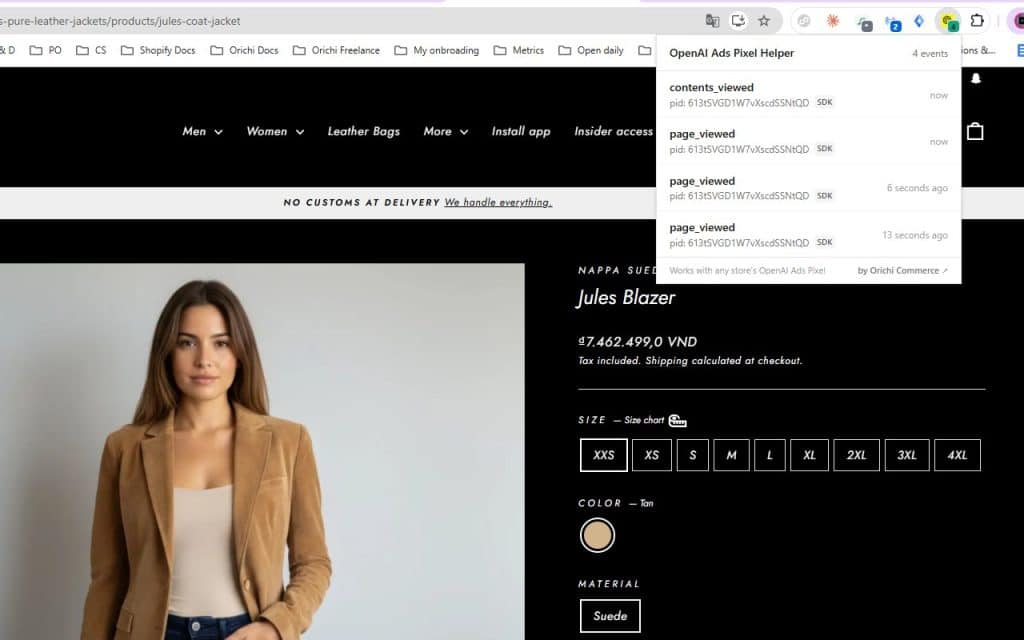
You can open a page where the OpenAI Ads Pixel is installed, trigger actions such as viewing a product or adding an item to the cart, and inspect the events detected by the extension.
This is especially useful when you need to verify tracking before relying on campaign data.
Key Features
The current Chrome Web Store listing says OpenAI Ads Pixel Helper:
- Inspects OpenAI Ads Pixel events in real time
- Shows the events firing on the current page
- Captures five official event types:
page_viewedcontents_vieweditems_addedcheckout_startedorder_created
- Displays the full payload for each captured event
- Works with implementations following the OpenAI Ads Pixel specification
- Processes captured data locally in the extension rather than sending it to a server
The current listing identifies Orichi – ICommerceVN as the developer and shows version 0.1.1, updated September 13, 2026.
Best For
OpenAI Ads advertisers, Shopify merchants, developers, and QA teams who need to check whether OpenAI Ads Pixel events are firing correctly.
It is particularly useful when the problem is tracking verification, rather than campaign creation or keyword research.
Pricing
The extension is available through the Chrome Web Store. Check the current listing for the latest availability.
Choosing the Right Extension for Your Workflow
You do not need all of these extensions installed.
The better approach is to start with the part of your advertising workflow that is slowing you down.
| Your main task | Useful extension |
|---|---|
| Google Ads keyword cleanup | Keywordme |
| Keyword research | Keyword Surfer |
| Competitor website research | Similarweb / SpyFu |
| Google tag verification | Tag Assistant |
| Ad preview | Whatagraph Ads Preview Tool |
| Privacy and tracker inspection | Ghostery |
| Google Analytics debugging | Google Analytics Debugger |
| OpenAI Ads Pixel debugging | OpenAI Ads Pixel Helper |
The important distinction is between research tools and tracking tools.
Keyword Surfer, Similarweb, and SpyFu help you research before or during campaign planning.
Tag Assistant and Google Analytics Debugger help you investigate tracking implementations.
OpenAI Ads Pixel Helper serves a narrower purpose: checking OpenAI Ads Pixel events directly on a live page.
That means you do not need to choose an extension simply because it has more features. Choose the one that matches the problem you are trying to solve.
A Simple Chrome Extension Stack for Advertisers
For a basic advertising workflow, you can think about these tools in four stages:
1. Research
Use Keyword Surfer, Similarweb, or SpyFu to understand keywords, websites, and competitors.
2. Campaign work
Use Google Ads-focused tools such as Keywordme when you are cleaning and expanding your campaign keywords.
3. Tracking
Use Tag Assistant or Google Analytics Debugger when you need to check Google tracking.
4. Pixel QA
Use OpenAI Ads Pixel Helper when you need to inspect OpenAI Ads Pixel events.
This separation makes the choice easier.
You are not looking for the “most powerful” Chrome extension. You are looking for the extension that answers the question you have right now.
Final Takeaway
Chrome extensions can remove a lot of unnecessary switching between advertising platforms, research tools, and debugging interfaces.
For keyword work, look at tools such as Keywordme and Keyword Surfer.
For competitor research, Similarweb and SpyFu can help you investigate websites from the browser.
For Google tracking, Tag Assistant and Google Analytics Debugger are more relevant.
And if your workflow involves OpenAI Ads, OpenAI Ads Pixel Helper gives you a dedicated way to inspect the Pixel events firing on a page before you rely on the tracking data.
The best setup depends on your workflow. Start with the problem you need to solve, then install the extension that gives you the information you need with the fewest extra steps.