Most YouTube size searches focus on one key insight: users need exact, official dimensions to avoid quality loss, cropping, or formatting errors across devices. The priority is clear technical specs 16:9 aspect ratio for videos, 1080p or 4K resolution, 1280×720 thumbnail size, and 2560×1440 banner with safe area to ensure professional display on desktop, mobile, and TV.
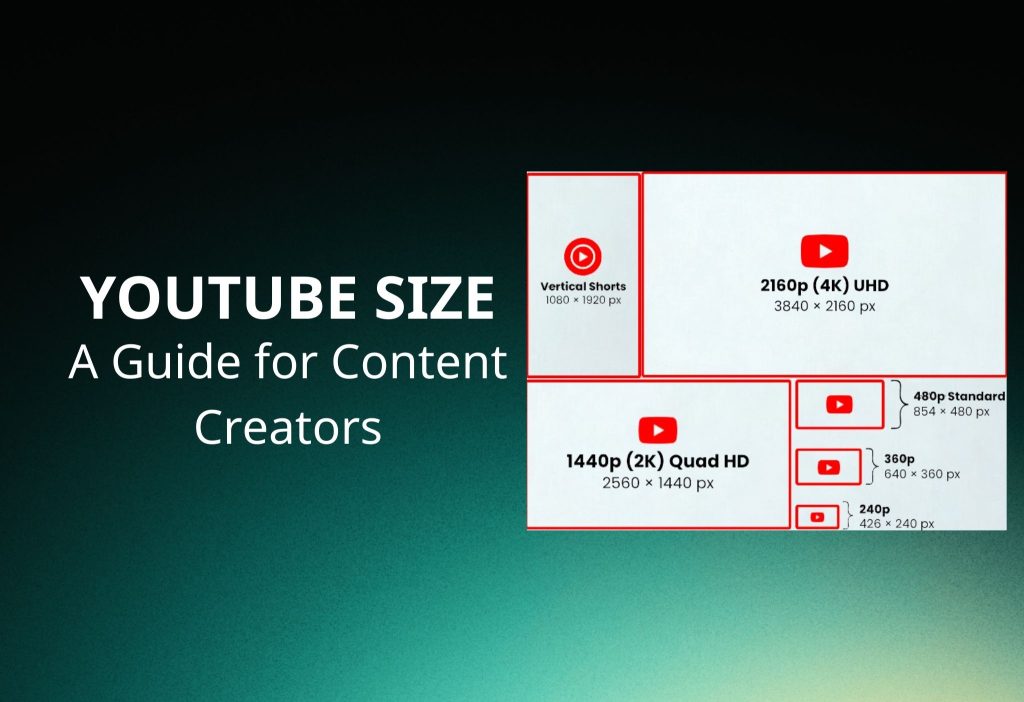
This article summarizes all important YouTube size standards in one place, including video resolution, thumbnail dimensions, banner safe zone, aspect ratio rules, and upload limits, so you can create and upload content correctly without trial and error.
YouTube Video Size
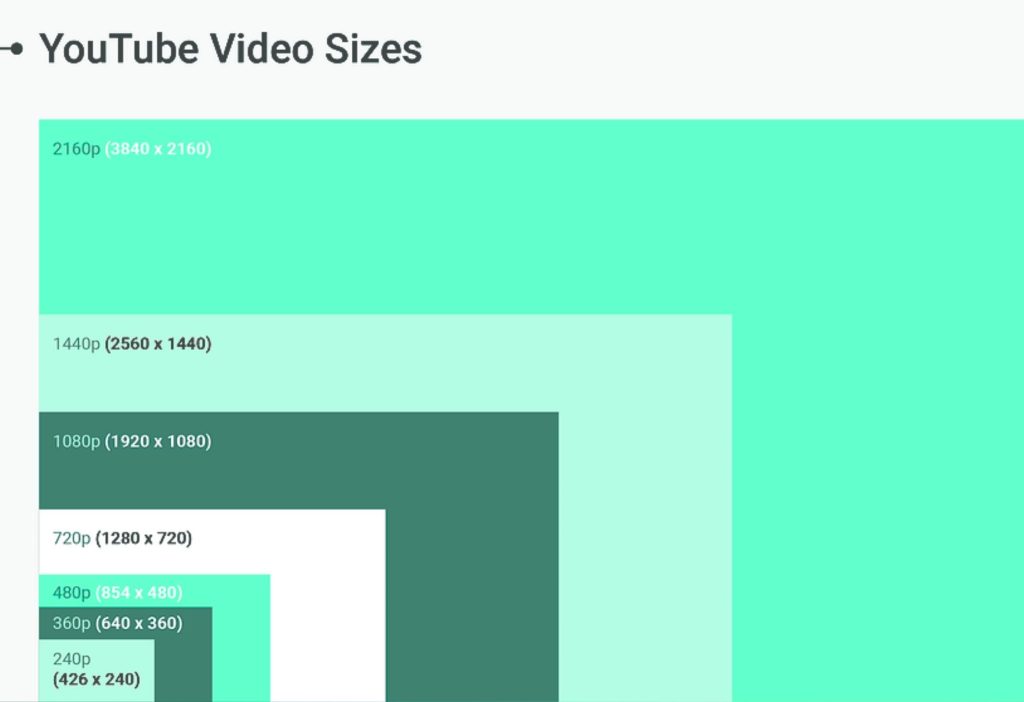
Recommended YouTube video size for long videos is 16:9 aspect ratio.
For best quality, upload in 1080p (1920 x 1080 pixels) or 4K (3840 x 2160 pixels). These are the standard resolutions used for high-quality display on desktop, TV, and mobile.
Here are the common YouTube video dimensions:
- 1080p (HD): 1920 x 1080 – 16:9
- 4K (2160p): 3840 x 2160 – 16:9
- 720p (HD): 1280 x 720 – 16:9
- 480p (SD): 854 x 480 – 16:9
Most users search for exact pixel size, recommended dimensions, resolution specs, and 16:9 aspect ratio to make sure their video uploads correctly and looks sharp. Using the correct width and height prevents black bars and low quality.
For normal long videos, always use landscape (16:9). Portrait format (9:16) is mainly for Shorts, not standard long content.
Video size is measured in pixels, not inches or centimeters. Inches and cm refer to physical screen size, not digital video upload size.
If you want safe and professional quality, choose 1920 x 1080 (1080p) or higher.
YouTube Thumbnail Size
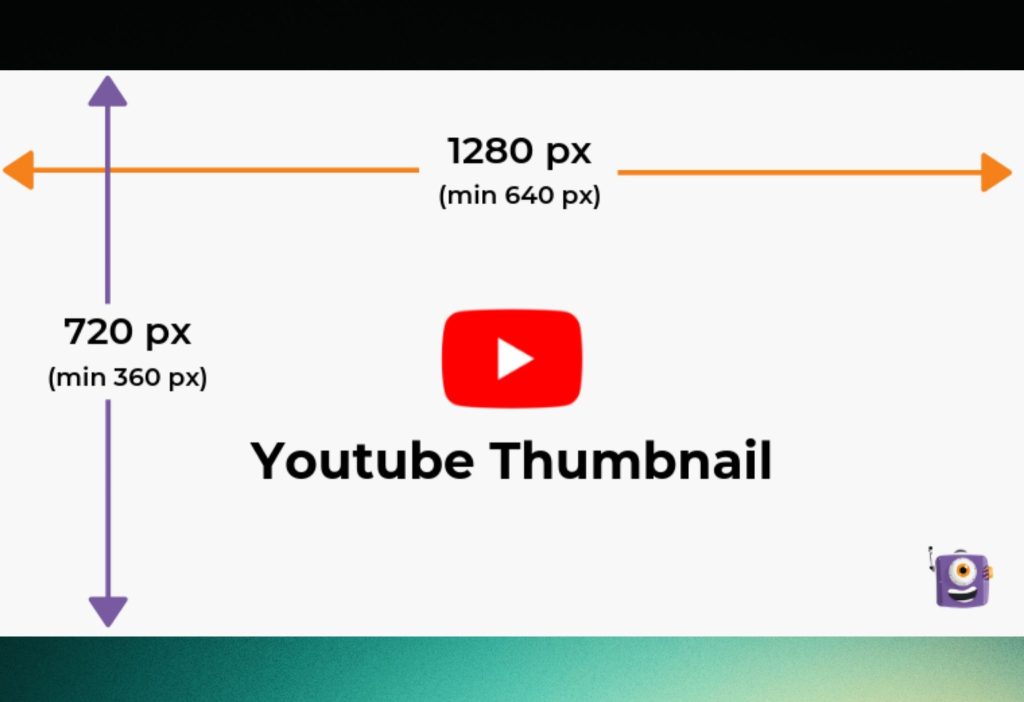
Recommended YouTube thumbnail size is 1280 × 720 pixels with 16:9 aspect ratio.
Your image should be under 2MB and saved as JPG, PNG, GIF, or BMP.
This is the official size used for video thumbnails. Using the correct dimensions helps your thumbnail look clear on desktop and mobile, without being cropped or blurry.
Here are the full specifications:
- Ideal size: 1280 × 720 pixels
- Aspect ratio: 16:9
- Minimum width: 640 pixels
- Maximum file size: 2MB
- Supported formats: JPG, PNG, GIF, BMP
Most users search for exact thumbnail dimensions, 16:9 ratio, custom thumbnail size, and file size limit because they want better click-through rate (CTR). A sharp and correctly sized thumbnail helps attract more clicks.
Some creators design thumbnails in 1920 × 1080 for higher editing quality. However, YouTube displays thumbnails at 1280 × 720, so using 1920 × 1080 is not necessary.
When people search for “YouTube size image,” they usually mean thumbnail size or sometimes channel banner size, not video size.
For best results, always design your thumbnail in 1280 × 720 pixels, 16:9 ratio, under 2MB.
YouTube Banner Size
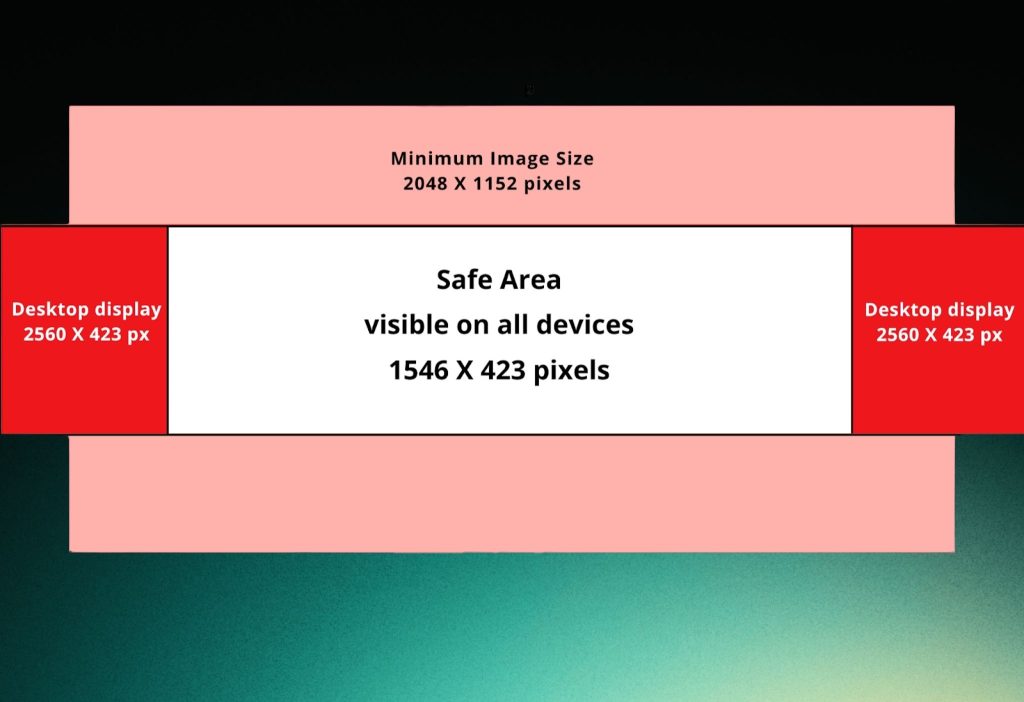
Recommended YouTube banner size is 2560 × 1440 pixels with 16:9 aspect ratio.
To make sure your logo and text are not cut off, place important content inside the safe area: 1546 × 423 pixels (center area).
This is very important because the banner displays differently on TV, desktop, and mobile. If you design without using the safe zone, your text or logo may be cropped.
Here are the full specifications:
- Ideal size: 2560 × 1440 pixels
- Safe area (visible on all devices): 1546 × 423 pixels
- Minimum upload size: 2048 × 1152 pixels
- Aspect ratio: 16:9
- Maximum file size: 6MB
- Supported formats: JPG, PNG, GIF, BMP (non-animated)
Most users search for banner 2560×1440, channel art safe zone 1546×423, and minimum 2048×1152 because they want their channel header to look professional on every screen.
How it displays:
- TV shows the full 2560 × 1440
- Desktop crops the sides
- Mobile shows only the center (safe area)
To avoid losing important elements, always keep logos, text, and key design inside the 1546 × 423 safe zone.
For best results, design your banner at 2560 × 1440, but focus on the center safe area to ensure perfect display on all devices.
FAQ
Are YouTube videos 16:9 or 4:3?
YouTube standard format is 16:9 (widescreen). This works best on modern TVs, laptops, and mobile devices.
The 4:3 ratio is old format (vintage style). If you upload 4:3, YouTube will add black bars on the sides.
For normal videos, always use 16:9.
Is a YouTube video 1920×1080?
Yes. 1920 × 1080 is Full HD (1080p) and is one of the most recommended resolutions for YouTube.
It uses 16:9 ratio and gives clear, professional quality.
If you want higher quality, you can upload in 4K (3840 × 2160).
Should I use 1280×720 or 1920×1080 for YouTube thumbnails?
Official recommended size is 1280 × 720 pixels (16:9) with minimum width 640px.
Some creators design in 1920 × 1080 to keep more detail when cropping or sharing on social media.
However, YouTube displays thumbnails at 1280 × 720, so using larger size is optional.
Best practice:
Use 1280 × 720, 16:9 ratio, under 2MB.
How many GB does YT take?
YouTube does not share total platform storage size.
For upload limits (verified accounts):
- Maximum file size: 256 GB per video
- Maximum length: 12 hours per video
Estimated file size depends on bitrate and resolution. Example:
| Resolution | 1 Minute | 60 Minutes |
|---|---|---|
| 1080p | ~120 MB | ~7.2 GB |
| 4K | ~350 MB | ~21 GB |
Actual size may change depending on bitrate, frame rate, and compression.
Read more: How to Message Someone on YouTube