In B2B sales and competitive research, knowing what technology a prospect or competitor uses can be the difference between a cold call that lands and one that doesn’t. A SaaS company pitching to businesses already on Salesforce, a digital agency targeting WordPress sites running slow themes, an e-commerce platform identifying Shopify merchants — all of these outreach strategies depend on one thing: accurate technology data at scale.
The problem is that most marketers and sales teams are still prospecting blind. They rely on LinkedIn filters, website traffic estimates, and industry databases that tell you company size and revenue — but not what CMS the prospect runs, which analytics platform they use, or whether they recently switched payment processors. That technology gap means missed intent signals and generic outreach that fails to resonate.
BuiltWith was built to close that gap. It scans more than 250 million websites to detect the technologies powering them — from CMS and hosting to marketing tools, payment gateways, and JavaScript frameworks — and turns that data into filterable, exportable lead lists and market intelligence reports. For B2B sales teams, SEO specialists, and competitive analysts who need precise technology profiling at scale, BuiltWith has been the category standard for over a decade.
This BuiltWith review covers everything in 2026: features, pricing, real-world use cases, honest weaknesses, and how it compares to Wappalyzer and W3Techs for different research and sales scenarios.
What Is BuiltWith?
BuiltWith is a web technology intelligence platform that indexes the technology stacks of websites across the internet and makes that data searchable, filterable, and exportable for sales, marketing, and research purposes. It identifies over 110,000 different web technologies — including CMS platforms, e-commerce carts, analytics tools, advertising networks, hosting providers, CDN services, JavaScript frameworks, and more — across 250 million+ websites globally.
The platform belongs to the “technographics” or “technology intelligence” category, alongside tools like Wappalyzer, W3Techs, and SimilarTech. Unlike general competitive intelligence tools, BuiltWith is specifically focused on technology detection — who uses what, at what scale, and how that has changed over time.
Its primary users are B2B sales development representatives (SDRs), demand generation marketers, SEO specialists, digital agencies, and market researchers who need to build targeted prospect lists based on technology usage, track competitor technology adoption trends, or understand market share dynamics across the web. Enterprise and mid-market companies in the US, EU, and increasingly in Asia-Pacific and Southeast Asia represent the core paying user base, with particular growth among e-commerce sellers using BuiltWith to track competitor platforms in the SEA region.
What Does BuiltWith Do?
BuiltWith turns the invisible layer of web technology into actionable business intelligence. Here is what it enables in practice:
- Identify exactly which CMS, analytics tools, payment processors, CDN providers, and 110,000+ other technologies any website is using — instantly
- Build targeted prospect lists by filtering the 250M+ site database by technology usage, geographic location, company revenue estimates, industry vertical, and site traffic tier
- Track when a competitor or prospect switches from one technology to another — detecting intent signals like migrating from Magento to Shopify or adding a new marketing automation platform
- Generate market share reports showing technology adoption rates, competitive trends, and growth trajectories across entire categories
- Identify e-commerce stores by cart type, estimated sales revenue, product category, and technology stack for precise commercial targeting
- Set alerts on specific domains to receive notifications when their technology stack changes — enabling timely, context-aware outreach
- Export leads in CSV or Excel with metadata fields including technology details, estimated revenue, contact data, and company information
- Access historical technology data to see how a website’s stack has evolved over time — useful for both competitive research and account-based sales intelligence
- Query the database programmatically via API for integration into custom CRM pipelines and automated prospecting workflows
How Does BuiltWith Work?
Step 1: Run a Technology Lookup
Start by entering any domain into the BuiltWith search bar — free for individual site lookups. The platform returns a full technology profile: every detectable technology in use, organized by category (analytics, CMS, hosting, frameworks, advertising, email, payment, CDN, and more). The browser extension delivers this same report instantly while you browse any website, without leaving the page.
Step 2: Build a Targeted Lead List
Move to the Leads section and use the technology filter to search for all websites using a specific technology — for example, all sites running Shopify in the United States with estimated monthly revenue above $50,000. Layer additional filters: industry vertical, country, number of employees, traffic tier, or whether the site was recently detected as adding a new technology. The result is a list of matching domains filtered to your precise ideal customer profile.
Step 3: Analyze Market Share and Trends
Use the Market Share reports to see how a technology’s adoption has changed over time — monthly data showing which platforms are gaining share, which are declining, and what sites are switching between them. This is particularly valuable for understanding whether a competitor platform is growing or contracting and where the opportunity exists for displacement-based outreach.
Step 4: Set Alerts and Track Technology Changes
Configure domain-level alerts on target accounts or competitor websites to receive notifications when their technology stack changes. When a prospect adds a new CRM, drops a competitor’s tool, or migrates their e-commerce platform, BuiltWith flags it — giving your sales team a time-sensitive, context-aware reason to reach out.
Step 5: Export Data and Integrate with Your Pipeline
Export filtered lead lists in CSV or Excel format with all available metadata fields. On Pro and Enterprise plans, use the API to push technology data directly into your CRM or prospecting tool, automating technographic enrichment at scale. BuiltWith connects with major CRM platforms and sales engagement tools to slot into existing outbound workflows.
Key Features of BuiltWith
1. Technology Profiler: 250M+ Sites, 110,000+ Technologies
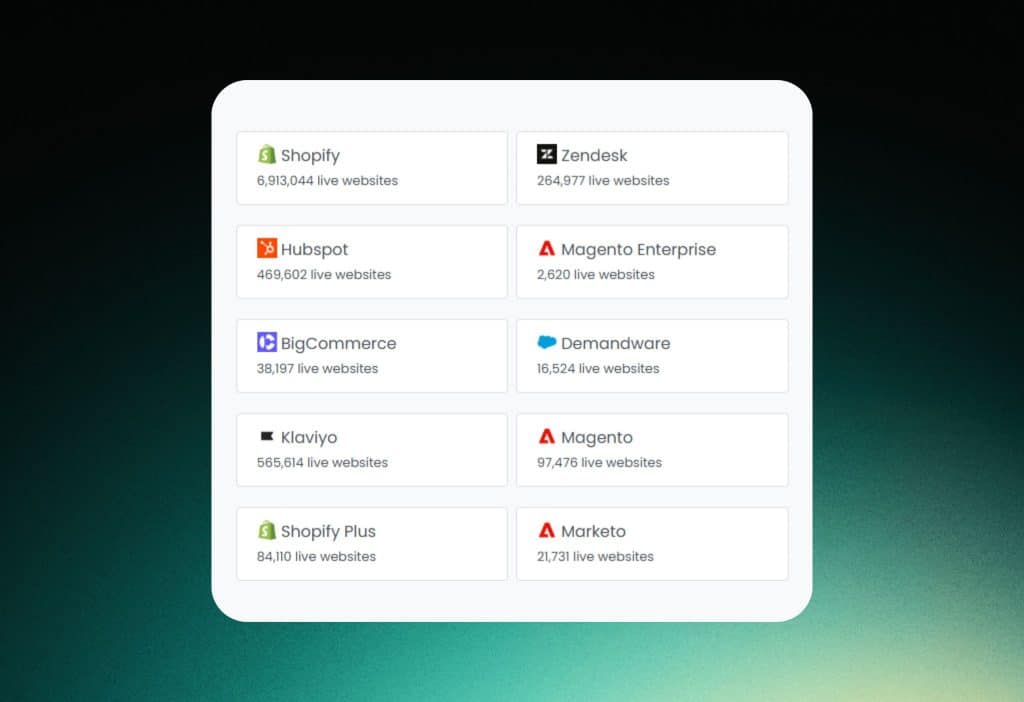
BuiltWith’s core engine continuously crawls and indexes the web, detecting over 110,000 different technologies across more than 250 million websites. Coverage spans every layer of the web stack: hosting providers, CDN networks, CMS platforms, JavaScript frameworks, analytics and tracking tools, email marketing platforms, payment processors, advertising networks, chat widgets, and more.
The breadth and depth of the technology index is BuiltWith’s most defensible competitive advantage. For sales teams building prospect lists based on specific technology criteria, the database size determines the quality and completeness of the output. A list of all US-based businesses using HubSpot CRM alongside WooCommerce, for example, is only as useful as the underlying data’s accuracy and coverage. BuiltWith’s decade-plus of crawl data and continuous indexing puts its coverage ahead of most competitors for enterprise-grade prospecting.
2. Lead Generation Lists with Advanced Filtering
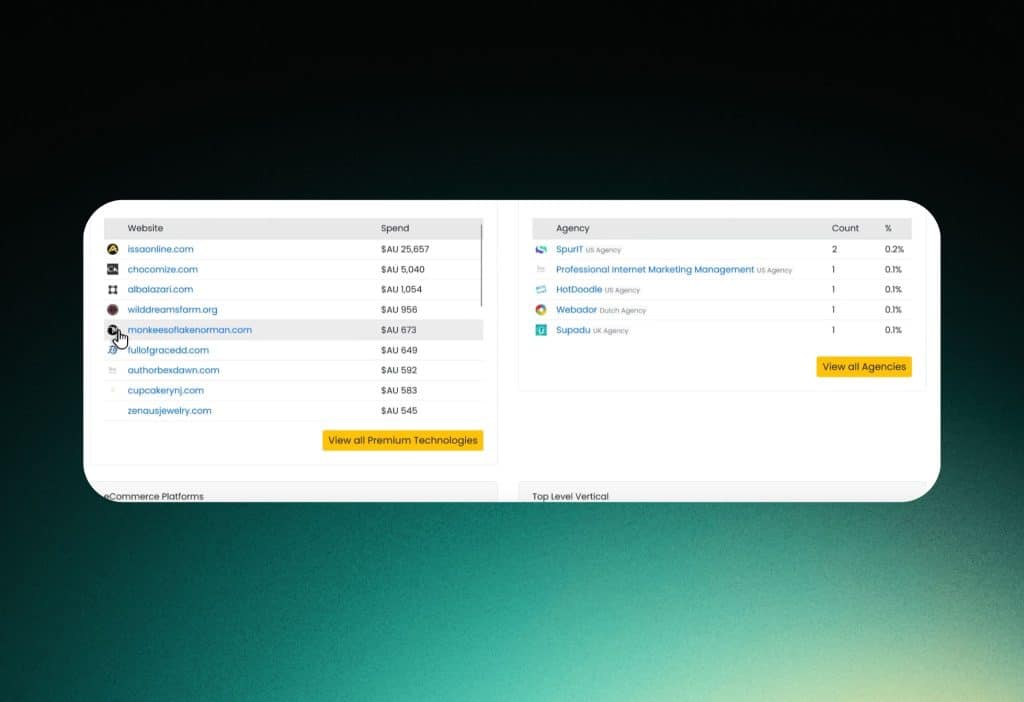
The Leads feature is where BuiltWith’s technology database becomes a direct revenue tool. Users can filter the global site index by any combination of: specific technologies in use (or recently added/removed), geographic region down to country or state, estimated company revenue, industry vertical, website traffic tier, e-commerce platform type, and more. The result is a filterable, sortable list of matching domains with associated metadata.
For B2B SDRs building outbound sequences targeting, say, mid-market US retailers running outdated analytics platforms, this filtering capability compresses what would be weeks of manual research into a matter of minutes. The ability to filter by recently added or removed technologies adds a temporal intent layer — identifying prospects who are actively changing their stack are more likely to be in an evaluation mindset than static accounts.
3. Market Share Reports and Trend Analysis

BuiltWith generates market share data showing the relative adoption of technologies across the web — percentage of sites using each platform, month-over-month and year-over-year trends, and competitive dynamics between platforms. Reports can be filtered by technology category, geographic market, site traffic tier, and industry vertical.
For competitive analysts and product marketers, these reports provide an objective, data-driven view of where their category is heading. Seeing that a specific e-commerce platform has been losing share to a competitor for six consecutive months — backed by raw domain counts — is a more credible basis for product positioning decisions than analyst reports or survey data alone. For agencies, market share reports provide concrete evidence for technology recommendations to clients.
4. Historical Data and Technology Change Alerts

BuiltWith stores historical technology data for sites in its index, allowing users to trace how a website’s stack has evolved over time. This historical view is available at the individual site level — useful for account-based research — and at the aggregate level for market trend analysis. Domain-level alerts notify users when a tracked site adds, removes, or changes a specific technology.
The alerts feature is particularly high-value for sales and account management use cases. A technology change at a prospect or customer site is one of the clearest intent signals available: a company adding a new marketing automation platform is in an active growth phase; one removing a competitor’s tool may be open to alternatives. Receiving that signal at the moment it happens — rather than discovering it retroactively — creates a timing advantage in competitive sales situations.
5. E-Commerce Intelligence

BuiltWith includes a dedicated e-commerce intelligence layer that classifies online stores by cart platform (Shopify, WooCommerce, Magento, BigCommerce, and others), estimates sales revenue, categorizes products, and identifies associated technologies like payment gateways and shipping providers. This makes it possible to build hyper-targeted prospect lists for the e-commerce vertical — for example, all Shopify stores in the UK with estimated annual revenue between $500K and $5M selling in the apparel category.
For SaaS companies targeting e-commerce merchants, payment solution providers, fulfillment services, and digital agencies serving e-com clients, this granularity transforms cold prospecting into warm, contextualized outreach. E-commerce intelligence is increasingly relevant for SEA and Vietnamese markets as BuiltWith expands its coverage of the region’s rapidly growing online retail sector.
6. Browser Extension, API, and Export Tools

The BuiltWith browser extension delivers an instant technology profile of any website you visit — no need to navigate to the platform to run a lookup. This makes it a practical tool for quick competitive checks during sales calls, customer research, or casual browsing. The export functionality covers CSV and Excel with configurable metadata fields, and the API provides programmatic access for teams building automated technographic enrichment workflows into their CRM or data pipeline.
API access is available on Pro and Enterprise plans and supports bulk queries, real-time lookups, and webhook integration for technology change events. For enterprise sales teams running high-volume outbound and wanting BuiltWith data to flow automatically into Salesforce or HubSpot records, the API is the feature that makes the platform operationally scalable rather than a research-only tool.
Who Is BuiltWith For?
B2B Sales Development Representatives and SDR Teams
SDRs using BuiltWith can build highly targeted prospect lists filtered by the specific technologies their product integrates with or displaces. Rather than prospecting generic company lists and manually researching each account, they receive pre-filtered lists of companies using exactly the stack that makes them likely buyers — dramatically improving outreach relevance and response rates.
Demand Generation and B2B Marketers
Marketers running ABM (account-based marketing) campaigns use BuiltWith to identify and prioritize target accounts by technology usage, then enrich campaign targeting with technographic data. Market share reports provide competitive context for positioning campaigns and identifying technology displacement opportunities.
Digital Agencies and Consultants
Agencies use BuiltWith to identify potential clients running outdated or suboptimal technology stacks, benchmark client technology usage against industry norms, and demonstrate competitive intelligence value to prospects. Web development and SEO agencies particularly benefit from the CMS and analytics detection capabilities for new business development.
Competitive Analysts and Market Researchers
Research teams tracking technology adoption trends, building industry technology landscape reports, or analyzing competitor platform dynamics use BuiltWith’s market share and historical data features. The ability to quantify how many sites have switched from one platform to another over a specific period provides empirical backing for market analysis.
E-Commerce Technology Vendors and Service Providers
SaaS companies, payment processors, fulfillment providers, and agencies targeting e-commerce merchants use BuiltWith’s e-commerce intelligence layer to build prospect lists filtered by platform, revenue tier, and product category. This is one of the most commercially precise applications of BuiltWith’s data, enabling outreach with immediate, account-specific context.
BuiltWith Integrations
BuiltWith’s integration ecosystem is designed around the enterprise sales and marketing technology stack:
- CRM platforms: Salesforce, HubSpot — technographic data can be pushed to contact and account records via API or manual export
- Sales engagement: Integration with outbound tools via CSV import or API-powered enrichment workflows
- Data enrichment pipelines: REST API with bulk query support for automated technographic enrichment in custom data stacks
- Browser extension: Chrome and Firefox extensions for instant site profiling while browsing
- Export formats: CSV and Excel with configurable metadata fields for direct import into any CRM, data warehouse, or spreadsheet workflow
- Webhooks: Technology change event webhooks for real-time notification integration with Slack, email, or internal tooling
- Third-party data platforms: Compatibility with data enrichment and sales intelligence platforms that consume technographic data
BuiltWith’s native CRM integrations are functional but less seamless than dedicated sales intelligence platforms like ZoomInfo or Cognism that embed directly into CRM workflows. For teams with high-volume API usage requirements, the REST API is robust, but the setup requires technical resource investment to configure at scale. Non-technical users managing export-based workflows will find the CSV process straightforward but more manual than a native CRM connector.
BuiltWith Pricing: Plans Breakdown
BuiltWith offers a free lookup tier for individual site checks and paid plans for list generation, reporting, and API access. All pricing below reflects monthly billing; annual discounts are available.
| Plan | Price/mo | Key Inclusions | Best For |
| Free | $0 | Single site lookups, basic technology profile, browser extension | Researchers, freelancers, and individuals doing occasional competitive checks |
| Lite | ~$295/mo | Lead generation lists, CSV export, market share reports, 5,000 lead credits, limited API | SMBs and individual sales reps building targeted prospect lists for the first time |
| Pro | ~$495/mo | Higher lead credits, advanced filtering, technology change alerts, enhanced API access | Growing sales teams and agencies running ongoing outbound campaigns with regular list refreshes |
| Team | ~$995/mo | Multi-user access, maximum lead credits, full API, e-commerce intelligence, priority support | Enterprise sales teams, large agencies, and data-intensive market research operations |
| Enterprise | Custom | Unlimited reports, dedicated API quota, custom data feeds, SLA, account management | High-volume data consumers, large enterprises, and platforms building on BuiltWith data |
BuiltWith’s pricing is its most significant barrier to adoption. At $295/month for the entry Lite plan, it sits well above what individual freelancers, small startups, or occasional researchers can justify. The free tier’s single-site lookup is genuinely useful for spot checks but provides none of the list generation or reporting capabilities that define the platform’s core value.
For the organizations it’s built for — enterprise sales teams and mid-to-large agencies with dedicated prospecting budgets — the ROI calculation is straightforward: if a single deal sourced from a BuiltWith-generated list exceeds the annual subscription cost, the platform pays for itself. The cost becomes harder to justify for teams running low-volume outbound or without a structured sales development function.
BuiltWith Pros
- Unmatched database scale: 250M+ indexed sites and 110,000+ detectable technologies gives BuiltWith the deepest coverage in the category — critical for building comprehensive, non-incomplete prospect lists at scale.
- Technology change alerts create real intent signals: Receiving a notification when a target account adds or removes a specific technology is a direct, time-sensitive sales trigger that generic sales intelligence tools don’t provide.
- Highly granular filtering for precise prospecting: The ability to combine technology usage, geography, revenue estimate, industry vertical, and traffic tier into a single query produces prospect lists with a degree of specificity that manual research cannot replicate.
- E-commerce intelligence is a standout capability: Platform-specific, revenue-estimated, category-filtered e-commerce prospect lists are genuinely hard to build through any other tool at this level of specificity.
- Historical data supports both sales and research use cases: The ability to trace a website’s technology evolution over time adds depth to both account-level research and category-level market analysis.
- Browser extension makes individual lookups frictionless: The instant-profile extension is genuinely useful for competitive research and pre-call preparation without requiring platform access.
- Robust API for enterprise automation: For teams with technical resources, the API enables full integration into CRM enrichment workflows, turning BuiltWith from a research tool into an automated data pipeline.
BuiltWith Cons
- Pricing is prohibitive for small teams and freelancers: The $295/month Lite plan entry point puts BuiltWith out of reach for individual consultants, small startups, and teams without dedicated sales development budgets. This is a fundamental positioning choice, not a gap that a cheaper tier option fully addresses.
- Detection is not always real-time: BuiltWith’s data reflects its crawl frequency, which means technology changes on a website may take days or weeks to appear in the platform’s records. Wappalyzer and browser extension tools like WhatRuns can detect current technologies faster for individual site checks, though they lack BuiltWith’s list generation and historical data capabilities.
- Advanced filtering has a learning curve for non-technical users: The full power of BuiltWith’s lead generation filters requires familiarity with technographic data concepts and the platform’s query structure. New users without a data or sales operations background often underutilize the filtering capabilities, particularly when combining multiple filter types or using Boolean logic in technology combination queries.
BuiltWith vs Competitors
BuiltWith vs Wappalyzer
Wappalyzer covers 100M+ sites and is particularly strong as a real-time technology detection tool. Its browser extension is fast and accurate for instant lookups, its alerts feature is competitive, and its pricing starts lower than BuiltWith — making it more accessible for smaller teams and individual researchers. Wappalyzer also offers a comparable lead generation feature, though its database is smaller than BuiltWith’s.
BuiltWith wins on database scale, historical data depth, and e-commerce intelligence granularity. For teams whose primary use case is large-scale list generation filtered by precise technology combinations, BuiltWith’s 250M+ site coverage and decade of historical data provides an edge in completeness and data richness. For teams that primarily need real-time site profiling, accurate browser-based lookups, and alerts at a lower price point, Wappalyzer is a compelling alternative. The two tools are not direct substitutes — they serve similar needs at different price and scale points.
BuiltWith vs W3Techs
W3Techs is a free, statistics-oriented web technology survey that publishes market share data for CMS platforms, hosting providers, and other web technologies across its own sampling of high-traffic sites. It’s widely cited for category-level market share figures and is genuinely useful for macro trend analysis.
W3Techs is not a lead generation tool. It does not provide filterable domain lists, company-level data, alerts, or API access. The comparison is relevant primarily for researchers using BuiltWith’s market share reports — W3Techs provides similar category-level statistics for free, which may satisfy basic market research needs without a BuiltWith subscription. For any use case that requires identifying specific companies or domains, W3Techs has no comparable functionality, and BuiltWith has no direct free alternative.
BuiltWith vs WhatRuns
WhatRuns is a lightweight browser extension focused on instant, real-time technology detection while browsing. It’s free, fast, and accurate for single-site lookups — a strong tool for quick competitive checks and pre-meeting research. It does not include a database, lead generation features, list export, alerts, historical data, or market share reports.
WhatRuns is best understood as a complementary tool to BuiltWith rather than a competitor. Many enterprise users run both: WhatRuns for quick real-time spot checks during browsing, BuiltWith for systematic list generation and market research. For users who only need the browser extension functionality, WhatRuns is free and sufficient. For users who need anything beyond a single-site real-time lookup, BuiltWith is in a different capability tier entirely.
Alternatives to BuiltWith
- Wappalyzer: The most direct competitor. Real-time detection, 100M+ site coverage, alerts, and lead generation at a lower price point. Best for teams that need fast lookups and list generation without BuiltWith’s premium pricing. Free tier available; paid plans start at a lower entry than BuiltWith’s Lite.
- SimilarTech: Specializes in technology-based B2B lead generation with a database of 500M+ sites. Offers comparable filtering capabilities to BuiltWith and is often competitive on pricing for specific use cases. Worth evaluating alongside BuiltWith for large-scale prospecting requirements.
- Datanyze (by ZoomInfo): A technographics platform acquired by ZoomInfo that integrates technology data into its broader company intelligence database. Best for teams already in the ZoomInfo ecosystem who want technographic enrichment within their existing sales intelligence workflow. Pricing is bundled into ZoomInfo plans.
- W3Techs: Free web technology survey platform useful for macro market share statistics and category-level trend research. No lead generation or domain-level data. Best as a free supplement for researchers who need category statistics without prospecting needs.
- Hunter.io / Apollo.io: General sales intelligence platforms that include some technographic data alongside contact information, company data, and email finding. Less specialized than BuiltWith for pure technology detection but more comprehensive for complete contact-enriched outbound lists. Better value for teams that need both company data and technology data in one tool.
BuiltWith FAQs
Is BuiltWith free to use?
BuiltWith offers a free lookup for individual website technology profiles — you can enter any domain and see its technology stack at no cost. The free tier also includes the browser extension. However, the features that define BuiltWith’s core value — lead generation lists, CSV export, market share reports, technology alerts, and API access — all require a paid plan starting at approximately $295/month.
How accurate is BuiltWith’s technology detection?
BuiltWith’s detection accuracy is generally considered high for technologies that leave identifiable markers in a site’s HTML, HTTP headers, or DNS records. Technologies that run entirely server-side or obfuscate their fingerprints may be missed. Like all web crawlers, BuiltWith’s data reflects its crawl schedule rather than real-time site status — meaning very recent technology changes may not appear immediately. For most B2B prospecting and competitive research use cases, the accuracy level is sufficient for practical purposes.
What is BuiltWith used for in B2B sales?
B2B sales teams primarily use BuiltWith to build targeted prospect lists filtered by specific technology usage — identifying companies using a competitor’s product, a complementary tool, or a platform they integrate with. Technology change alerts are used to detect intent signals: when a target account adds or removes a technology, it can indicate they’re in an active evaluation or transition phase — a high-value moment for outreach.
How does BuiltWith compare to ZoomInfo for prospecting?
ZoomInfo is a broader sales intelligence platform covering company data, contact information, intent data, and technographics. BuiltWith is a specialist technographics tool with deeper technology coverage and more granular tech-based filtering. For teams that primarily filter prospects by technology usage and need the highest data coverage for that specific dimension, BuiltWith is the more capable tool. For teams that need a complete sales intelligence platform with contact data alongside technology signals, ZoomInfo (or its Datanyze integration) covers more ground in one place.
Can BuiltWith be used for e-commerce competitor research?
Yes. BuiltWith’s e-commerce intelligence features allow you to look up any online store’s technology stack — including their cart platform, payment processor, shipping integrations, and marketing tools. You can also build filtered lists of e-commerce stores by platform, estimated revenue, and product category. This makes it useful for competitive benchmarking, identifying technology gaps in your own stack relative to competitors, or prospecting e-commerce merchants as potential customers.
Does BuiltWith have an API?
Yes. BuiltWith provides a REST API available on Pro, Team, and Enterprise plans. The API supports individual site lookups, bulk technology queries, and market share data retrieval. It can be integrated with CRM platforms, data warehouses, and custom prospecting tools to automate technographic data enrichment at scale. API quota and rate limits vary by plan tier.
Final Verdict: Is BuiltWith Worth It in 2026?
BuiltWith occupies a well-defined position in the B2B intelligence landscape: it does one thing — web technology profiling — at a scale and depth that no direct competitor currently matches. For the organizations it is built for, the case for the investment is clear. A sales team that can identify every mid-market US company running a specific CRM, filter by revenue tier, and receive an alert the moment one of those companies changes their stack has a prospecting infrastructure that simply cannot be replicated manually.
The ROI calculation depends entirely on how the data is used. Enterprise sales teams, growth-focused agencies, and technology vendors targeting specific platform ecosystems are the users for whom BuiltWith pays for itself repeatedly. A single well-sourced deal from a BuiltWith lead list typically covers months of subscription cost at the Lite or Pro tier.
The platform’s weaknesses are real but bounded. The pricing is a genuine barrier for smaller operators — the free tier is useful for spot checks but not for systematic prospecting, and the jump to $295/month is steep. The detection lag relative to real-time tools matters for time-sensitive research but is largely irrelevant for list-building workflows where crawl frequency is sufficient. The learning curve for advanced filtering is surmountable but requires investment for new users.
For individual freelancers, very small teams, or users with only occasional competitive research needs, Wappalyzer or the free BuiltWith tier — supplemented by a general sales intelligence platform — covers most practical requirements at a fraction of the cost.
For B2B sales teams, demand gen marketers, competitive analysts, and agencies who need technology-filtered prospect lists and market intelligence at enterprise scale, BuiltWith remains the definitive tool in its category in 2026.
Overall Rating: 8.3 / 10
Best for: B2B SDR teams, demand generation marketers, digital agencies, e-commerce technology vendors, and competitive analysts who need large-scale, technology-filtered prospect lists, market share reporting, and intent-signal alerts — and have the budget and sales volume to justify an enterprise-tier tool.
Skip if: You are a freelancer or small team with occasional competitive research needs and a limited budget (Wappalyzer is a better-value starting point), or you need a complete sales intelligence platform with contact data built in (consider ZoomInfo or Apollo.io instead).