The Meta (Facebook) warning “Make sure identical events share a matching deduplication key” means Meta received the same event twice, once from your Pixel (browser) and once from the Conversions API (server), but couldn’t tell they were the same event. Most of the time, the fix is to send the same event_id from both sides.
This guide explains what the warning means, the most common causes on Shopify, and how to fix and check it step by step.
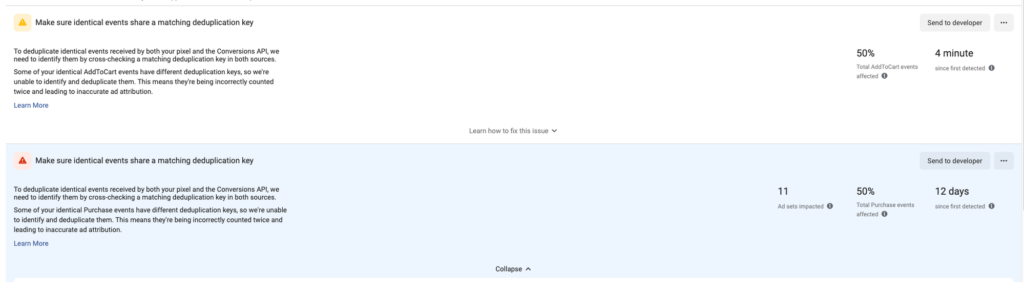
What Does This Error Mean?
When you use both Meta Pixel and the Conversions API (CAPI), each purchase, add to cart, or page view can be sent to Meta twice. That’s normal. Meta is supposed to merge the two copies into one. This is called deduplication.
To merge them, Meta needs a matching “key” on both copies. If the key is missing or different, Meta can’t merge them. You see this warning, and your reports may count the same purchase twice.

How Meta Matches Duplicate Events
Meta uses two ways to match a browser event with a server event:
- Event name + event ID (recommended): Both copies use the same event name (for example,
Purchase) and the sameevent_id. This is the most reliable method. - Event name + fbp or external ID: Meta can also match using the browser ID (
_fbp) or your own customer ID (external_id). This works as a backup, but it’s less precise.
In practice, a missing or mismatched event_id is the cause in most cases.
Common Causes on Shopify
- Only one side sends an event_id. The Pixel sends an ID, but the server event doesn’t (or the other way around).
- The two sides create different IDs. For example, the Pixel uses the order number and the server uses the checkout token.
- Two tools send the same event. Shopify’s Facebook & Instagram channel and a separate pixel app (or code pasted into your theme) both send Purchase events, each with its own ID.
- Event names don’t match. One side sends
Purchaseand the other sendspurchaseor a custom name.
How to Fix It
Step 1: Pick one tool for each event. Decide which tool sends your Pixel and CAPI events. Turn off duplicate sources, such as old pixel code in your theme or a second app sending the same pixel.
Step 2: Send the same event_id from browser and server. Make sure each event gets one ID, and that exact ID is sent with both the Pixel event and the CAPI event.
Step 3: Use the exact same event name. Use Meta’s standard names (PageView, ViewContent, AddToCart, InitiateCheckout, Purchase) on both sides.
Step 4: Add backup keys. Send _fbp and, if possible, external_id with server events. This helps Meta match events even when something goes wrong with the ID.
Don’t want to fix event IDs by hand?
OC Meta Pixel sets up Meta Pixel and Conversions API on Shopify in about 2 minutes, with event deduplication built in. No coding needed. Free plan available.
How to Check That Deduplication Works
- Open Meta Events Manager and select your pixel.
- Go to the Test Events tab.
- Open your store in another tab and do the action you want to test, such as adding a product to cart.
- Back in Test Events, look for two copies of the same event: one from Browser and one from Server.
- Check that both show the same event ID and that the server event is marked as deduplicated.

If both copies share the same ID and Meta marks them as deduplicated, your setup is working.
Watch this short video to see how to test your Conversions API events:
Can You Ignore This Warning?
Sometimes. If Test Events clearly shows your events being deduplicated, the warning in Events Manager may simply be out of date. It often takes a few days to clear after a fix. If the warning stays for more than a week, or your purchase count in Meta is much higher than in Shopify, the problem is still there.
FAQs
Does this error hurt my Facebook Ads?
It can. If Meta counts one purchase twice, your reports show more sales than you really made, and Meta may optimize your ads on wrong data.
What is event_id?
It’s a unique ID you attach to each event, such as one purchase. When the Pixel and the Conversions API send the same event_id, Meta knows they are the same event and keeps only one.
Why does Shopify send duplicate events?
Usually because more than one tool is sending the same pixel. For example, Shopify’s Facebook & Instagram channel plus a pixel app, or old pixel code left in the theme.
What’s the easiest way to fix this on Shopify?
Use one tool that handles both Pixel and Conversions API together. OC Meta Pixel does this without code and supports multiple pixels.
Conclusion
This warning almost always comes down to one thing: the browser and server copies of an event don’t share the same key. Use one tool per event, send the same event_id from both sides, and check the result in Test Events.
Need help? Contact us at orichi247@gmail.com.
Read more: Top 7 Facebook Pixel Conversion API Errors and How to Fix Them · Meta Pixel vs Conversions API for Shopify